The GNU Privacy Handbook
========================
Copyright © 1999 by The Free Software Foundation
Permission is granted to copy, distribute and/or modify this document
under the terms of the GNU Free Documentation License, Version 1.1 or
any later version published by the Free Software Foundation; with no
Invariant Sections, no Front-Cover Texts, and no Back-Cover Texts. A
copy of the license is included in the section entitled "GNU Free
Documentation License".
Please direct questions, bug reports, or suggestions concerning this
manual to the maintainer, Mike Ashley (<
[email protected]>). When
referring to the manual please specify which version of the manual you
have by using this version string: $Name: v1_1 $.
Contributors to this manual include Matthew Copeland, Joergen Grahn,
and David A. Wheeler. J Horacio MG has translated the manual to
Spanish.
From: <
https://www.gnupg.org/gph/en/manual.html>
Table of Contents
=================
1. Getting Started
Generating a new keypair
Generating a revocation certificate
Exchanging keys
Exporting a public key
Importing a public key
Encrypting and decrypting documents
Making and verifying signatures
Clearsigned documents
Detached signatures
2. Concepts
Symmetric ciphers
Public-key ciphers
Hybrid ciphers
Digital signatures
3. Key Management
Managing your own keypair
Key integrity
Adding and deleting key components
Revoking key components
Updating a key's expiration time
Validating other keys on your public keyring
Trust in a key's owner
Using trust to validate keys
Distributing keys
4. Daily use of GnuPG
Defining your security needs
Choosing a key size
Protecting your private key
Selecting expiration dates and using subkeys
Managing your web of trust
Building your web of trust
Using GnuPG legally
5. Topics
Writing user interfaces
A. GNU Free Documentation License
0. PREAMBLE
1. APPLICABILITY AND DEFINITIONS
2. VERBATIM COPYING
3. COPYING IN QUANTITY
4. MODIFICATIONS
5. COMBINING DOCUMENTS
6. COLLECTIONS OF DOCUMENTS
7. AGGREGATION WITH INDEPENDENT WORKS
8. TRANSLATION
9. TERMINATION
10. FUTURE REVISIONS OF THIS LICENSE
How to use this License for your documents
List of Figures
3-1. A hypothetical web of trust
Chapter 1. Getting Started
==========================
GnuPG is a tool for secure communication. This chapter is a quick-start
guide that covers the core functionality of GnuPG. This includes
keypair creation, exchanging and verifying keys, encrypting and
decrypting documents, and authenticating documents with digital
signatures. It does not explain in detail the concepts behind
public-key cryptography, encryption, and digital signatures. This is
covered in Chapter 2. It also does not explain how to use GnuPG
wisely. This is covered in Chapters 3 and 4.
GnuPG uses public-key cryptography so that users may communicate
securely. In a public-key system, each user has a pair of keys
consisting of a private key and a public key. A user's private key is
kept secret; it need never be revealed. The public key may be given to
anyone with whom the user wants to communicate. GnuPG uses a somewhat
more sophisticated scheme in which a user has a primary keypair and
then zero or more additional subordinate keypairs. The primary and
subordinate keypairs are bundled to facilitate key management and the
bundle can often be considered simply as one keypair.
Generating a new keypair
========================
The command-line option --gen-key is used to create a new primary
keypair.
alice% gpg --gen-key
gpg (GnuPG) 0.9.4; Copyright (C) 1999 Free Software Foundation, Inc.
This program comes with ABSOLUTELY NO WARRANTY.
This is free software, and you are welcome to redistribute it
under certain conditions. See the file COPYING for details.
Please select what kind of key you want:
(1) DSA and ElGamal (default)
(2) DSA (sign only)
(4) ElGamal (sign and encrypt)
Your selection?
GnuPG is able to create several different types of keypairs, but a
primary key must be capable of making signatures. There are therefore
only three options. Option 1 actually creates two keypairs. A DSA
keypair is the primary keypair usable only for making signatures. An
ElGamal subordinate keypair is also created for encryption. Option 2 is
similar but creates only a DSA keypair. Option 4 [A] creates a
single ElGamal keypair usable for both making signatures and performing
encryption. In all cases it is possible to later add additional subkeys
for encryption and signing. For most users the default option is fine.
You must also choose a key size. The size of a DSA key must be between
512 and 1024 bits, and an ElGamal key may be of any size. GnuPG,
however, requires that keys be no smaller than 768 bits. Therefore, if
Option 1 was chosen and you choose a keysize larger than 1024 bits, the
ElGamal key will have the requested size, but the DSA key will be 1024
bits.
About to generate a new ELG-E keypair.
minimum keysize is 768 bits
default keysize is 1024 bits
highest suggested keysize is 2048 bits
What keysize do you want? (1024)
The longer the key the more secure it is against brute-force attacks,
but for almost all purposes the default keysize is adequate since it
would be cheaper to circumvent the encryption than try to break it.
Also, encryption and decryption will be slower as the key size is
increased, and a larger keysize may affect signature length. Once
selected, the keysize can never be changed.
Finally, you must choose an expiration date. If Option 1 was chosen,
the expiration date will be used for both the ElGamal and DSA keypairs.
Please specify how long the key should be valid.
0 = key does not expire
<n> = key expires in n days
<n>w = key expires in n weeks
<n>m = key expires in n months
<n>y = key expires in n years
Key is valid for? (0)
For most users a key that does not expire is adequate. The expiration
time should be chosen with care, however, since although it is possible
to change the expiration date after the key is created, it may be
difficult to communicate a change to users who have your public key.
You must provide a user ID in addition to the key parameters. The user
ID is used to associate the key being created with a real person.
You need a User-ID to identify your key; the software constructs the user id
from Real Name, Comment and Email Address in this form:
"Heinrich Heine (Der Dichter) <
[email protected]>"
Real name:
Only one user ID is created when a key is created, but it is possible
to create additional user IDs if you want to use the key in two or more
contexts, e.g., as an employee at work and a political activist on the
side. A user ID should be created carefully since it cannot be edited
after it is created.
GnuPG needs a passphrase to protect the primary and subordinate private
keys that you keep in your possession.
You need a Passphrase to protect your private key.
Enter passphrase:
There is no limit on the length of a passphrase, and it should be
carefully chosen. From the perspective of security, the passphrase to
unlock the private key is one of the weakest points in GnuPG (and other
public-key encryption systems as well) since it is the only protection
you have if another individual gets your private key. Ideally, the
passphrase should not use words from a dictionary and should mix the
case of alphabetic characters as well as use non-alphabetic characters.
A good passphrase is crucial to the secure use of GnuPG.
Generating a revocation certificate
===================================
After your keypair is created you should immediately generate a
revocation certificate for the primary public key using the option
--gen-revoke. If you forget your passphrase or if your private key is
compromised or lost, this revocation certificate may be published to
notify others that the public key should no longer be used. A revoked
public key can still be used to verify signatures made by you in the
past, but it cannot be used to encrypt future messages to you. It also
does not affect your ability to decrypt messages sent to you in the
past if you still do have access to the private key.
alice% gpg --output revoke.asc --gen-revoke mykey
[...]
The argument mykey must be a key specifier, either the key ID of your
primary keypair or any part of a user ID that identifies your keypair.
The generated certificate will be left in the file revoke.asc. If the
--output option is omitted, the result will be placed on standard
output. Since the certificate is short, you may wish to print a
hardcopy of the certificate to store somewhere safe such as your safe
deposit box. The certificate should not be stored where others can
access it since anybody can publish the revocation certificate and
render the corresponding public key useless.
Exchanging keys
===============
To communicate with others you must exchange public keys. To list the
keys on your public keyring use the command-line option --list-keys.
alice% gpg --list-keys
/users/alice/.gnupg/pubring.gpg
---------------------------------------
pub 1024D/BB7576AC 1999-06-04 Alice (Judge) <
[email protected]>
sub 1024g/78E9A8FA 1999-06-04
Exporting a public key
======================
To send your public key to a correspondent you must first export it.
The command-line option --export is used to do this. It takes an
additional argument identifying the public key to export. As with the
--gen-revoke option, either the key ID or any part of the user ID may
be used to identify the key to export.
alice% gpg --output alice.gpg --export
[email protected]
The key is exported in a binary format, but this can be inconvenient
when the key is to be sent though email or published on a web page.
GnuPG therefore supports a command-line option --armor [B] that
causes output to be generated in an ASCII-armored format similar to
uuencoded documents. In general, any output from GnuPG, e.g., keys,
encrypted documents, and signatures, can be ASCII-armored by adding the
--armor option.
alice% gpg --armor --export
[email protected]
-----BEGIN PGP PUBLIC KEY BLOCK-----
Version: GnuPG v0.9.7 (GNU/Linux)
Comment: For info see
http://www.gnupg.org
[...]
-----END PGP PUBLIC KEY BLOCK-----
Importing a public key
======================
A public key may be added to your public keyring with the --import
option.
alice% gpg --import blake.gpg
gpg: key 9E98BC16: public key imported
gpg: Total number processed: 1
gpg: imported: 1
alice% gpg --list-keys
/users/alice/.gnupg/pubring.gpg
---------------------------------------
pub 1024D/BB7576AC 1999-06-04 Alice (Judge) <
[email protected]>
sub 1024g/78E9A8FA 1999-06-04
pub 1024D/9E98BC16 1999-06-04 Blake (Executioner) <
[email protected]>
sub 1024g/5C8CBD41 1999-06-04
Once a key is imported it should be validated. GnuPG uses a powerful
and flexible trust model that does not require you to personally
validate each key you import. Some keys may need to be personally
validated, however. A key is validated by verifying the key's
fingerprint and then signing the key to certify it as a valid key. A
key's fingerprint can be quickly viewed with the --fingerprint
command-line option, but in order to certify the key you must edit it.
alice% gpg --edit-key
[email protected]
pub 1024D/9E98BC16 created: 1999-06-04 expires: never trust: -/q
sub 1024g/5C8CBD41 created: 1999-06-04 expires: never
(1) Blake (Executioner) <
[email protected]>
Command> fpr
pub 1024D/9E98BC16 1999-06-04 Blake (Executioner) <
[email protected]>
Fingerprint: 268F 448F CCD7 AF34 183E 52D8 9BDE 1A08 9E98 BC16
A key's fingerprint is verified with the key's owner. This may be done
in person or over the phone or through any other means as long as you
can guarantee that you are communicating with the key's true owner. If
the fingerprint you get is the same as the fingerprint the key's owner
gets, then you can be sure that you have a correct copy of the key.
After checking the fingerprint, you may sign the key to validate it.
Since key verification is a weak point in public-key cryptography, you
should be extremely careful and always check a key's fingerprint with
the owner before signing the key.
Command> sign
pub 1024D/9E98BC16 created: 1999-06-04 expires: never trust: -/q
Fingerprint: 268F 448F CCD7 AF34 183E 52D8 9BDE 1A08 9E98 BC16
Blake (Executioner) <
[email protected]>
Are you really sure that you want to sign this key
with your key: "Alice (Judge) <
[email protected]>"
Really sign?
Once signed you can check the key to list the signatures on it and see
the signature that you have added. Every user ID on the key will have
one or more self-signatures as well as a signature for each user that
has validated the key.
Command> check
uid Blake (Executioner) <
[email protected]>
sig! 9E98BC16 1999-06-04 [self-signature]
sig! BB7576AC 1999-06-04 Alice (Judge) <
[email protected]>
Encrypting and decrypting documents
===================================
A public and private key each have a specific role when encrypting and
decrypting documents. A public key may be thought of as an open safe.
When a correspondent encrypts a document using a public key, that
document is put in the safe, the safe shut, and the combination lock
spun several times. The corresponding private key is the combination
that can reopen the safe and retrieve the document. In other words,
only the person who holds the private key can recover a document
encrypted using the associated public key.
The procedure for encrypting and decrypting documents is
straightforward with this mental model. If you want to encrypt a
message to Alice, you encrypt it using Alice's public key, and she
decrypts it with her private key. If Alice wants to send you a message,
she encrypts it using your public key, and you decrypt it with your
private key.
To encrypt a document the option --encrypt is used. You must have the
public keys of the intended recipients. The software expects the name
of the document to encrypt as input; if omitted, it reads standard
input. The encrypted result is placed on standard output or as
specified using the option --output. The document is compressed for
additional security in addition to encrypting it.
alice% gpg --output doc.gpg --encrypt --recipient
[email protected] doc
The --recipient option is used once for each recipient and takes an
extra argument specifying the public key to which the document should
be encrypted. The encrypted document can only be decrypted by someone
with a private key that complements one of the recipients' public keys.
In particular, you cannot decrypt a document encrypted by you unless
you included your own public key in the recipient list.
To decrypt a message the option --decrypt is used. You need the private
key to which the message was encrypted. Similar to the encryption
process, the document to decrypt is input, and the decrypted result is
output.
blake% gpg --output doc --decrypt doc.gpg
You need a passphrase to unlock the secret key for
user: "Blake (Executioner) <
[email protected]>"
1024-bit ELG-E key, ID 5C8CBD41, created 1999-06-04 (main key ID 9E98BC16)
Enter passphrase:
Documents may also be encrypted without using public-key cryptography.
Instead, you use a symmetric cipher to encrypt the document. The key
used to drive the symmetric cipher is derived from a passphrase
supplied when the document is encrypted, and for good security, it
should not be the same passphrase that you use to protect your private
key. Symmetric encryption is useful for securing documents when the
passphrase does not need to be communicated to others. A document can
be encrypted with a symmetric cipher by using the --symmetric option.
alice% gpg --output doc.gpg --symmetric doc
Enter passphrase:
Making and verifying signatures
===============================
A digital signature certifies and timestamps a document. If the
document is subsequently modified in any way, a verification of the
signature will fail. A digital signature can serve the same purpose as
a hand-written signature with the additional benefit of being
tamper-resistant. The GnuPG source distribution, for example, is signed
so that users can verify that the source code has not been modified
since it was packaged.
Creating and verifying signatures uses the public/private keypair in an
operation different from encryption and decryption. A signature is
created using the private key of the signer. The signature is verified
using the corresponding public key. For example, Alice would use her
own private key to digitally sign her latest submission to the Journal
of Inorganic Chemistry. The associate editor handling her submission
would use Alice's public key to check the signature to verify that the
submission indeed came from Alice and that it had not been modified
since Alice sent it. A consequence of using digital signatures is that
it is difficult to deny that you made a digital signature since that
would imply your private key had been compromised.
The command-line option --sign is used to make a digital signature. The
document to sign is input, and the signed document is output.
alice% gpg --output doc.sig --sign doc
You need a passphrase to unlock the private key for
user: "Alice (Judge) <
[email protected]>"
1024-bit DSA key, ID BB7576AC, created 1999-06-04
Enter passphrase:
The document is compressed before being signed, and the output is in
binary format.
Given a signed document, you can either check the signature or check
the signature and recover the original document. To check the signature
use the --verify option. To verify the signature and extract the
document use the --decrypt option. The signed document to verify and
recover is input and the recovered document is output.
blake% gpg --output doc --decrypt doc.sig
gpg: Signature made Fri Jun 4 12:02:38 1999 CDT using DSA key ID BB7576AC
gpg: Good signature from "Alice (Judge) <
[email protected]>"
Clearsigned documents
=====================
A common use of digital signatures is to sign usenet postings or email
messages. In such situations it is undesirable to compress the document
while signing it. The option --clearsign causes the document to be
wrapped in an ASCII-armored signature but otherwise does not modify the
document.
alice% gpg --clearsign doc
You need a passphrase to unlock the secret key for
user: "Alice (Judge) <
[email protected]>"
1024-bit DSA key, ID BB7576AC, created 1999-06-04
-----BEGIN PGP SIGNED MESSAGE-----
Hash: SHA1
[...]
-----BEGIN PGP SIGNATURE-----
Version: GnuPG v0.9.7 (GNU/Linux)
Comment: For info see
http://www.gnupg.org
iEYEARECAAYFAjdYCQoACgkQJ9S6ULt1dqz6IwCfQ7wP6i/i8HhbcOSKF4ELyQB1
oCoAoOuqpRqEzr4kOkQqHRLE/b8/Rw2k
=y6kj
-----END PGP SIGNATURE-----
Detached signatures
===================
A signed document has limited usefulness. Other users must recover the
original document from the signed version, and even with clearsigned
documents, the signed document must be edited to recover the original.
Therefore, there is a third method for signing a document that creates
a detached signature, which is a separate file. A detached signature is
created using the --detach-sig option.
alice% gpg --output doc.sig --detach-sig doc
You need a passphrase to unlock the secret key for
user: "Alice (Judge) <
[email protected]>"
1024-bit DSA key, ID BB7576AC, created 1999-06-04
Enter passphrase:
Both the document and detached signature are needed to verify the
signature. The --verify option can be to check the signature.
blake% gpg --verify doc.sig doc
gpg: Signature made Fri Jun 4 12:38:46 1999 CDT using DSA key ID BB7576AC
gpg: Good signature from "Alice (Judge) <
[email protected]>"
Chapter 2. Concepts
===================
GnuPG makes uses of several cryptographic concepts including symmetric
ciphers, public-key ciphers, and one-way hashing. You can make basic
use GnuPG without fully understanding these concepts, but in order to
use it wisely some understanding of them is necessary.
This chapter introduces the basic cryptographic concepts used in GnuPG.
Other books cover these topics in much more detail. A good book with
which to pursue further study is [56]Bruce Schneier's [57] "Applied
Cryptography".
Symmetric ciphers
=================
A symmetric cipher is a cipher that uses the same key for both
encryption and decryption. Two parties communicating using a symmetric
cipher must agree on the key beforehand. Once they agree, the sender
encrypts a message using the key, sends it to the receiver, and the
receiver decrypts the message using the key. As an example, the German
Enigma is a symmetric cipher, and daily keys were distributed as code
books. Each day, a sending or receiving radio operator would consult
his copy of the code book to find the day's key. Radio traffic for that
day was then encrypted and decrypted using the day's key. Modern
examples of symmetric ciphers include 3DES, Blowfish, and IDEA.
A good cipher puts all the security in the key and none in the
algorithm. In other words, it should be no help to an attacker if he
knows which cipher is being used. Only if he obtains the key would
knowledge of the algorithm be needed. The ciphers used in GnuPG have
this property.
Since all the security is in the key, then it is important that it be
very difficult to guess the key. In other words, the set of possible
keys, i.e., the key space, needs to be large. While at Los Alamos,
Richard Feynman was famous for his ability to crack safes. To encourage
the mystique he even carried around a set of tools including an old
stethoscope. In reality, he used a variety of tricks to reduce the
number of combinations he had to try to a small number and then simply
guessed until he found the right combination. In other words, he
reduced the size of the key space.
Britain used machines to guess keys during World War 2. The German
Enigma had a very large key space, but the British built specialized
computing engines, the Bombes, to mechanically try keys until the day's
key was found. This meant that sometimes they found the day's key
within hours of the new key's use, but it also meant that on some days
they never did find the right key. The Bombes were not general-purpose
computers but were precursors to modern-day computers.
Today, computers can guess keys very quickly, and this is why key size
is important in modern cryptosystems. The cipher DES uses a 56-bit key,
which means that there are 2^56 possible keys. 2^56 is
72,057,594,037,927,936 keys. This is a lot of keys, but a
general-purpose computer can check the entire key space in a matter of
days. A specialized computer can check it in hours. On the other hand,
more recently designed ciphers such as 3DES, Blowfish, and IDEA all use
128-bit keys, which means there are 2^128 possible keys. This is many,
many more keys, and even if all the computers on the planet cooperated,
it could still take more time than the age of the universe to find the
key.
Public-key ciphers
==================
The primary problem with symmetric ciphers is not their security but
with key exchange. Once the sender and receiver have exchanged keys,
that key can be used to securely communicate, but what secure
communication channel was used to communicate the key itself? In
particular, it would probably be much easier for an attacker to work to
intercept the key than it is to try all the keys in the key space.
Another problem is the number of keys needed. If there are n people who
need to communicate, then n(n-1)/2 keys are needed for each pair of
people to communicate privately. This may be OK for a small number of
people but quickly becomes unwieldy for large groups of people.
Public-key ciphers were invented to avoid the key-exchange problem
entirely. A public-key cipher uses a pair of keys for sending messages.
The two keys belong to the person receiving the message. One key is a
public key and may be given to anybody. The other key is a private key
and is kept secret by the owner. A sender encrypts a message using the
public key and once encrypted, only the private key may be used to
decrypt it.
This protocol solves the key-exchange problem inherent with symmetric
ciphers. There is no need for the sender and receiver to agree upon a
key. All that is required is that some time before secret communication
the sender gets a copy of the receiver's public key. Furthermore, the
one public key can be used by anybody wishing to communicate with the
receiver. So only n keypairs are needed for n people to communicate
secretly with one another.
Public-key ciphers are based on one-way trapdoor functions. A one-way
function is a function that is easy to compute, but the inverse is hard
to compute. For example, it is easy to multiply two prime numbers
together to get a composite, but it is difficult to factor a composite
into its prime components. A one-way trapdoor function is similar, but
it has a trapdoor. That is, if some piece of information is known, it
becomes easy to compute the inverse. For example, if you have a number
made of two prime factors, then knowing one of the factors makes it
easy to compute the second. Given a public-key cipher based on prime
factorization, the public key contains a composite number made from two
large prime factors, and the encryption algorithm uses that composite
to encrypt the message. The algorithm to decrypt the message requires
knowing the prime factors, so decryption is easy if you have the
private key containing one of the factors but extremely difficult if
you do not have it.
As with good symmetric ciphers, with a good public-key cipher all of
the security rests with the key. Therefore, key size is a measure of
the system's security, but one cannot compare the size of a symmetric
cipher key and a public-key cipher key as a measure of their relative
security. In a brute-force attack on a symmetric cipher with a key size
of 80 bits, the attacker must enumerate up to 2^80 keys to find the
right key. In a brute-force attack on a public-key cipher with a key
size of 512 bits, the attacker must factor a composite number encoded
in 512 bits (up to 155 decimal digits). The workload for the attacker
is fundamentally different depending on the cipher he is attacking.
While 128 bits is sufficient for symmetric ciphers, given today's
factoring technology public keys with 1024 bits are recommended for
most purposes.
Hybrid ciphers
==============
Public-key ciphers are no panacea. Many symmetric ciphers are stronger
from a security standpoint, and public-key encryption and decryption
are more expensive than the corresponding operations in symmetric
systems. Public-key ciphers are nevertheless an effective tool for
distributing symmetric cipher keys, and that is how they are used in
hybrid cipher systems.
A hybrid cipher uses both a symmetric cipher and a public-key cipher.
It works by using a public-key cipher to share a key for the symmetric
cipher. The actual message being sent is then encrypted using the key
and sent to the recipient. Since symmetric key sharing is secure, the
symmetric key used is different for each message sent. Hence it is
sometimes called a session key.
Both PGP and GnuPG use hybrid ciphers. The session key, encrypted using
the public-key cipher, and the message being sent, encrypted with the
symmetric cipher, are automatically combined in one package. The
recipient uses his private-key to decrypt the session key and the
session key is then used to decrypt the message.
A hybrid cipher is no stronger than the public-key cipher or symmetric
cipher it uses, whichever is weaker. In PGP and GnuPG, the public-key
cipher is probably the weaker of the pair. Fortunately, however, if an
attacker could decrypt a session key it would only be useful for
reading the one message encrypted with that session key. The attacker
would have to start over and decrypt another session key in order to
read any other message.
Digital signatures
==================
A hash function is a many-to-one function that maps its input to a
value in a finite set. Typically this set is a range of natural
numbers. A simple hash function is f(x) = 0 for all integers x. A more
interesting hash function is f(x) = x mod 37, which maps x to the
remainder of dividing x by 37.
A document's digital signature is the result of applying a hash
function to the document. To be useful, however, the hash function
needs to satisfy two important properties. First, it should be hard to
find two documents that hash to the same value. Second, given a hash
value it should be hard to recover the document that produced that
value.
Some public-key ciphers [C] could be used to sign documents. The
signer encrypts the document with his private key. Anybody wishing to
check the signature and see the document simply uses the signer's
public key to decrypt the document. This algorithm does satisfy the two
properties needed from a good hash function, but in practice, this
algorithm is too slow to be useful.
An alternative is to use hash functions designed to satisfy these two
important properties. SHA and MD5 are examples of such algorithms.
Using such an algorithm, a document is signed by hashing it, and the
hash value is the signature. Another person can check the signature by
also hashing their copy of the document and comparing the hash value
they get with the hash value of the original document. If they match,
it is almost certain that the documents are identical.
Of course, the problem now is using a hash function for digital
signatures without permitting an attacker to interfere with signature
checking. If the document and signature are sent unencrypted, an
attacker could modify the document and generate a corresponding
signature without the recipient's knowledge. If only the document is
encrypted, an attacker could tamper with the signature and cause a
signature check to fail. A third option is to use a hybrid public-key
encryption to encrypt both the signature and document. The signer uses
his private key, and anybody can use his public key to check the
signature and document. This sounds good but is actually nonsense. If
this algorithm truly secured the document it would also secure it from
tampering and there would be no need for the signature. The more
serious problem, however, is that this does not protect either the
signature or document from tampering. With this algorithm, only the
session key for the symmetric cipher is encrypted using the signer's
private key. Anybody can use the public key to recover the session key.
Therefore, it is straightforward for an attacker to recover the session
key and use it to encrypt substitute documents and signatures to send
to others in the sender's name.
An algorithm that does work is to use a public key algorithm to encrypt
only the signature. In particular, the hash value is encrypted using
the signer's private key, and anybody can check the signature using the
public key. The signed document can be sent using any other encryption
algorithm including none if it is a public document. If the document is
modified the signature check will fail, but this is precisely what the
signature check is supposed to catch. The Digital Signature Standard
(DSA) is a public key signature algorithm that works as just described.
DSA is the primary signing algorithm used in GnuPG.
Chapter 3. Key Management
=========================
Key tampering is a major security weakness with public-key
cryptography. An eavesdropper may tamper with a user's keyrings or
forge a user's public key and post it for others to download and use.
For example, suppose Chloe wants to monitor the messages that Alice
sends to Blake. She could mount what is called a man in the middle
attack. In this attack, Chloe creates a new public/private keypair. She
replaces Alice's copy of Blake's public key with the new public key.
She then intercepts the messages that Alice sends to Blake. For each
intercept, she decrypts it using the new private key, reencrypts it
using Blake's true public key, and forwards the reencrypted message to
Blake. All messages sent from Alice to Blake can now be read by Chloe.
Good key management is crucial in order to ensure not just the
integrity of your keyrings but the integrity of other users' keyrings
as well. The core of key management in GnuPG is the notion of signing
keys. Key signing has two main purposes: it permits you to detect
tampering on your keyring, and it allows you to certify that a key
truly belongs to the person named by a user ID on the key. Key
signatures are also used in a scheme known as the web of trust to
extend certification to keys not directly signed by you but signed by
others you trust. Responsible users who practice good key management
can defeat key tampering as a practical attack on secure communication
with GnuPG.
Managing your own keypair
=========================
A keypair has a public key and a private key. A public key consists of
the public portion of the master signing key, the public portions of
the subordinate signing and encryption subkeys, and a set of user IDs
used to associate the public key with a real person. Each piece has
data about itself. For a key, this data includes its ID, when it was
created, when it will expire, etc. For a user ID, this data includes
the name of the real person it identifies, an optional comment, and an
email address. The structure of the private key is similar, except that
it contains only the private portions of the keys, and there is no user
ID information.
The command-line option --edit-key may be used to view a keypair. For
example,
chloe% gpg --edit-key
[email protected]
Secret key is available.
pub 1024D/26B6AAE1 created: 1999-06-15 expires: never trust: -/u
sub 2048g/0CF8CB7A created: 1999-06-15 expires: never
sub 1792G/08224617 created: 1999-06-15 expires: 2002-06-14
sub 960D/B1F423E7 created: 1999-06-15 expires: 2002-06-14
(1) Chloe (Jester) <
[email protected]>
(2) Chloe (Plebian) <
[email protected]>
Command>
The public key is displayed along with an indication of whether or not
the private key is available. Information about each component of the
public key is then listed. The first column indicates the type of the
key. The keyword pub identifies the public master signing key, and the
keyword sub identifies a public subordinate key. The second column
indicates the key's bit length, type, and ID. The type is D for a DSA
key, g for an encryption-only ElGamal key, and G for an ElGamal key
that may be used for both encryption and signing. The creation date and
expiration date are given in columns three and four. The user IDs are
listed following the keys.
More information about the key can be obtained with interactive
commands. The command toggle switches between the public and private
components of a keypair if indeed both components are available.
Command> toggle
sec 1024D/26B6AAE1 created: 1999-06-15 expires: never
sbb 2048g/0CF8CB7A created: 1999-06-15 expires: never
sbb 1792G/08224617 created: 1999-06-15 expires: 2002-06-14
sbb 960D/B1F423E7 created: 1999-06-15 expires: 2002-06-14
(1) Chloe (Jester) <
[email protected]>
(2) Chloe (Plebian) <
[email protected]>
The information provided is similar to the listing for the public-key
component. The keyword sec identifies the private master signing key,
and the keyword sbb identifies the private subordinates keys. The user
IDs from the public key are also listed for convenience.
Key integrity
=============
When you distribute your public key, you are distributing the public
components of your master and subordinate keys as well as the user IDs.
Distributing this material alone, however, is a security risk since it
is possible for an attacker to tamper with the key. The public key can
be modified by adding or substituting keys, or by adding or changing
user IDs. By tampering with a user ID, the attacker could change the
user ID's email address to have email redirected to himself. By
changing one of the encryption keys, the attacker would also be able to
decrypt the messages redirected to him.
Using digital signatures is a solution to this problem. When data is
signed by a private key, the corresponding public key is bound to the
signed data. In other words, only the corresponding public key can be
used to verify the signature and ensure that the data has not been
modified. A public key can be protected from tampering by using its
corresponding private master key to sign the public key components and
user IDs, thus binding the components to the public master key. Signing
public key components with the corresponding private master signing key
is called self-signing, and a public key that has self-signed user IDs
bound to it is called a certificate.
As an example, Chloe has two user IDs and three subkeys. The signatures
on the user IDs can be checked with the command check from the key edit
menu.
chloe% gpg --edit-key chloe
Secret key is available.
pub 1024D/26B6AAE1 created: 1999-06-15 expires: never trust: -/u
sub 2048g/0CF8CB7A created: 1999-06-15 expires: never
sub 1792G/08224617 created: 1999-06-15 expires: 2002-06-14
sub 960D/B1F423E7 created: 1999-06-15 expires: 2002-06-14
(1) Chloe (Jester) <
[email protected]>
(2) Chloe (Plebian) <
[email protected]>
Command> check
uid Chloe (Jester) <
[email protected]>
sig! 26B6AAE1 1999-06-15 [self-signature]
uid Chloe (Plebian) <
[email protected]>
sig! 26B6AAE1 1999-06-15 [self-signature]
As expected, the signing key for each signature is the master signing
key with key ID 0x26B6AAE1. The self-signatures on the subkeys are
present in the public key, but they are not shown by the GnuPG
interface.
Adding and deleting key components
==================================
Both new subkeys and new user IDs may be added to your keypair after it
has been created. A user ID is added using the command adduid. You are
prompted for a real name, email address, and comment just as when you
create an initial keypair. A subkey is added using the command addkey.
The interface is similar to the interface used when creating an initial
keypair. The subkey may be a DSA signing key, and encrypt-only ElGamal
key, or a sign-and-encrypt ElGamal key. When a subkey or user ID is
generated it is self-signed using your master signing key, which is why
you must supply your passphrase when the key is generated.
Additional user IDs are useful when you need multiple identities. For
example, you may have an identity for your job and an identity for your
work as a political activist. Coworkers will know you by your work user
ID. Coactivists will know you by your activist user ID. Since those
groups of people may not overlap, though, each group may not trust the
other user ID. Both user IDs are therefore necessary.
Additional subkeys are also useful. The user IDs associated with your
public master key are validated by the people with whom you
communicate, and changing the master key therefore requires
recertification. This may be difficult and time consuming if you
communicate with many people. On the other hand, it is good to
periodically change encryption subkeys. If a key is broken, all the
data encrypted with that key will be vulnerable. By changing keys,
however, only the data encrypted with the one broken key will be
revealed.
Subkeys and user IDs may also be deleted. To delete a subkey or user ID
you must first select it using the key or uid commands respectively.
These commands are toggles. For example, the command key 2 selects the
second subkey, and invoking key 2 again deselects it. If no extra
argument is given, all subkeys or user IDs are deselected. Once the
user IDs to be deleted are selected, the command deluid actually
deletes the user IDs from your key. Similarly, the command delkey
deletes all selected subkeys from both your public and private keys.
For local keyring management, deleting key components is a good way to
trim other people's public keys of unnecessary material. Deleting user
IDs and subkeys on your own key, however, is not always wise since it
complicates key distribution. By default, when a user imports your
updated public key it will be merged with the old copy of your public
key on his ring if it exists. The components from both keys are
combined in the merge, and this effectively restores any components you
deleted. To properly update the key, the user must first delete the old
version of your key and then import the new version. This puts an extra
burden on the people with whom you communicate. Furthermore, if you
send your key to a keyserver, the merge will happen regardless, and
anybody who downloads your key from a keyserver will never see your key
with components deleted. Consequently, for updating your own key it is
better to revoke key components instead of deleting them.
Revoking key components
=======================
To revoke a subkey it must be selected. Once selected it may be revoked
with the revkey command. The key is revoked by adding a revocation
self-signature to the key. Unlike the command-line option --gen-revoke,
the effect of revoking a subkey is immediate.
Command> revkey
Do you really want to revoke this key? y
You need a passphrase to unlock the secret key for
user: "Chloe (Jester) <
[email protected]>"
1024-bit DSA key, ID B87DBA93, created 1999-06-28
pub 1024D/B87DBA93 created: 1999-06-28 expires: never trust: -/u
sub 2048g/B7934539 created: 1999-06-28 expires: never
sub 1792G/4E3160AD created: 1999-06-29 expires: 2000-06-28
rev! subkey has been revoked: 1999-06-29
sub 960D/E1F56448 created: 1999-06-29 expires: 2000-06-28
(1) Chloe (Jester) <
[email protected]>
(2) Chloe (Plebian) <
[email protected]>
A user ID is revoked differently. Normally, a user ID collects
signatures that attest that the user ID describes the person who
actually owns the associated key. In theory, a user ID describes a
person forever, since that person will never change. In practice,
though, elements of the user ID such as the email address and comment
may change over time, thus invalidating the user ID.
The OpenPGP specification does not support user ID revocation, but a
user ID can effectively be revoked by revoking the self-signature on
the user ID. For the security reasons described previously,
correspondents will not trust a user ID with no valid self-signature.
A signature is revoked by using the command revsig. Since you may have
signed any number of user IDs, the user interface prompts you to decide
for each signature whether or not to revoke it.
Command> revsig
You have signed these user IDs:
Chloe (Jester) <
[email protected]>
signed by B87DBA93 at 1999-06-28
Chloe (Plebian) <
[email protected]>
signed by B87DBA93 at 1999-06-28
user ID: "Chloe (Jester) <
[email protected]>"
signed with your key B87DBA93 at 1999-06-28
Create a revocation certificate for this signature? (y/N)n
user ID: "Chloe (Plebian) <
[email protected]>"
signed with your key B87DBA93 at 1999-06-28
Create a revocation certificate for this signature? (y/N)y
You are about to revoke these signatures:
Chloe (Plebian) <
[email protected]>
signed by B87DBA93 at 1999-06-28
Really create the revocation certificates? (y/N)y
You need a passphrase to unlock the secret key for
user: "Chloe (Jester) <
[email protected]>"
1024-bit DSA key, ID B87DBA93, created 1999-06-28
pub 1024D/B87DBA93 created: 1999-06-28 expires: never trust: -/u
sub 2048g/B7934539 created: 1999-06-28 expires: never
sub 1792G/4E3160AD created: 1999-06-29 expires: 2000-06-28
rev! subkey has been revoked: 1999-06-29
sub 960D/E1F56448 created: 1999-06-29 expires: 2000-06-28
(1) Chloe (Jester) <
[email protected]>
(2) Chloe (Plebian) <
[email protected]>
A revoked user ID is indicated by the revocation signature on the ID
when the signatures on the key's user IDs are listed.
Command> check
uid Chloe (Jester) <
[email protected]>
sig! B87DBA93 1999-06-28 [self-signature]
uid Chloe (Plebian) <
[email protected]>
rev! B87DBA93 1999-06-29 [revocation]
sig! B87DBA93 1999-06-28 [self-signature]
Revoking both subkeys and self-signatures on user IDs adds revocation
self-signatures to the key. Since signatures are being added and no
material is deleted, a revocation will always be visible to others when
your updated public key is distributed and merged with older copies of
it. Revocation therefore guarantees that everybody has a consistent
copy of your public key.
Updating a key's expiration time
================================
The expiration time of a key may be updated with the command expire
from the key edit menu. If no key is selected the expiration time of
the primary key is updated. Otherwise the expiration time of the
selected subordinate key is updated.
A key's expiration time is associated with the key's self-signature.
The expiration time is updated by deleting the old self-signature and
adding a new self-signature. Since correspondents will not have deleted
the old self-signature, they will see an additional self-signature on
the key when they update their copy of your key. The latest
self-signature takes precedence, however, so all correspondents will
unambiguously know the expiration times of your keys.
Validating other keys on your public keyring
============================================
In Chapter 1 a procedure was given to validate your correspondents'
public keys: a correspondent's key is validated by personally checking
his key's fingerprint and then signing his public key with your private
key. By personally checking the fingerprint you can be sure that the
key really does belong to him, and since you have signed they key, you
can be sure to detect any tampering with it in the future.
Unfortunately, this procedure is awkward when either you must validate
a large number of keys or communicate with people whom you do not know
personally.
GnuPG addresses this problem with a mechanism popularly known as the
web of trust. In the web of trust model, responsibility for validating
public keys is delegated to people you trust. For example, suppose
* Alice has signed Blake's key, and
* Blake has signed Chloe's key and Dharma's key.
If Alice trusts Blake to properly validate keys that he signs, then
Alice can infer that Chloe's and Dharma's keys are valid without having
to personally check them. She simply uses her validated copy of Blake's
public key to check that Blake's signatures on Chloe's and Dharma's are
good. In general, assuming that Alice fully trusts everybody to
properly validate keys they sign, then any key signed by a valid key is
also considered valid. The root is Alice's key, which is axiomatically
assumed to be valid.
Trust in a key's owner
======================
In practice trust is subjective. For example, Blake's key is valid to
Alice since she signed it, but she may not trust Blake to properly
validate keys that he signs. In that case, she would not take Chloe's
and Dharma's key as valid based on Blake's signatures alone. The web of
trust model accounts for this by associating with each public key on
your keyring an indication of how much you trust the key's owner. There
are four trust levels.
unknown
Nothing is known about the owner's judgment in key signing. Keys
on your public keyring that you do not own initially have this
trust level.
none
The owner is known to improperly sign other keys.
marginal
The owner understands the implications of key signing and
properly validates keys before signing them.
full
The owner has an excellent understanding of key signing, and his
signature on a key would be as good as your own.
A key's trust level is something that you alone assign to the key, and
it is considered private information. It is not packaged with the key
when it is exported; it is even stored separately from your keyrings in
a separate database.
The GnuPG key editor may be used to adjust your trust in a key's owner.
The command is trust. In this example Alice edits her trust in Blake
and then updates the trust database to recompute which keys are valid
based on her new trust in Blake.
alice% gpg --edit-key blake
pub 1024D/8B927C8A created: 1999-07-02 expires: never trust: q/f
sub 1024g/C19EA233 created: 1999-07-02 expires: never
(1) Blake (Executioner) <
[email protected]>
Command> trust
pub 1024D/8B927C8A created: 1999-07-02 expires: never trust: q/f
sub 1024g/C19EA233 created: 1999-07-02 expires: never
(1) Blake (Executioner) <
[email protected]>
Please decide how far you trust this user to correctly
verify other users' keys (by looking at passports,
checking fingerprints from different sources...)?
1 = Don't know
2 = I do NOT trust
3 = I trust marginally
4 = I trust fully
s = please show me more information
m = back to the main menu
Your decision? 3
pub 1024D/8B927C8A created: 1999-07-02 expires: never trust: m/f
sub 1024g/C19EA233 created: 1999-07-02 expires: never
(1) Blake (Executioner) <
[email protected]>
Command> quit
[...]
Trust in the key's owner and the key's validity are indicated to the
right when the key is displayed. Trust in the owner is displayed first
and the key's validity is second [D]. The four trust/validity levels
are abbreviated: unknown (q), none (n), marginal (m), and full (f). In
this case, Blake's key is fully valid since Alice signed it herself.
She initially has an unknown trust in Blake to properly sign other keys
but decides to trust him marginally.
Using trust to validate keys
============================
The web of trust allows a more elaborate algorithm to be used to
validate a key. Formerly, a key was considered valid only if you signed
it personally. A more flexible algorithm can now be used: a key K is
considered valid if it meets two conditions:
1. it is signed by enough valid keys, meaning
+ you have signed it personally,
+ it has been signed by one fully trusted key, or
+ it has been signed by three marginally trusted keys; and
2. the path of signed keys leading from K back to your own key is five
steps or shorter.
The path length, number of marginally trusted keys required, and number
of fully trusted keys required may be adjusted. The numbers given above
are the default values used by GnuPG.
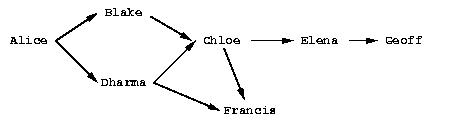
Figure 3-1 shows a web of trust rooted at Alice. The graph
illustrates who has signed who's keys. The table shows which keys Alice
considers valid based on her trust in the other members of the web.
This example assumes that two marginally-trusted keys or one
fully-trusted key is needed to validate another key. The maximum path
length is three.
When computing valid keys in the example, Blake and Dharma's are always
considered fully valid since they were signed directly by Alice. The
validity of the other keys depends on trust. In the first case, Dharma
is trusted fully, which implies that Chloe's and Francis's keys will be
considered valid. In the second example, Blake and Dharma are trusted
marginally. Since two marginally trusted keys are needed to fully
validate a key, Chloe's key will be considered fully valid, but
Francis's key will be considered only marginally valid. In the case
where Chloe and Dharma are marginally trusted, Chloe's key will be
marginally valid since Dharma's key is fully valid. Francis's key,
however, will also be considered marginally valid since only a fully
valid key can be used to validate other keys, and Dharma's key is the
only fully valid key that has been used to sign Francis's key. When
marginal trust in Blake is added, Chloe's key becomes fully valid and
can then be used to fully validate Francis's key and marginally
validate Elena's key. Lastly, when Blake, Chloe, and Elena are fully
trusted, this is still insufficient to validate Geoff's key since the
maximum certification path is three, but the path length from Geoff
back to Alice is four.
The web of trust model is a flexible approach to the problem of safe
public key exchange. It permits you to tune GnuPG to reflect how you
use it. At one extreme you may insist on multiple, short paths from
your key to another key K in order to trust it. On the other hand, you
may be satisfied with longer paths and perhaps as little as one path
from your key to the other key K. Requiring multiple, short paths is a
strong guarantee that K belongs to whom your think it does. The price,
of course, is that it is more difficult to validate keys since you must
personally sign more keys than if you accepted fewer and longer paths.
Figure 3-1. A hypothetical web of trust
=======================================
[63]A graph indicating who has signed who's key
<
https://www.gnupg.org/gph/en/signatures.jpg>
Row: 1
Marginal Trust: None
Full Trust: Dharma
Marginal Validity: None
Full Validity: Blake, Chloe, Dharma, Francis
Row: 2
Marginal Trust: Blake, Dharma
Full Trust: None
Marginal Validity: Francis
Full Validity: Blake, Chloe, Dharma
Row: 3
Marginal Trust: Chloe, Dharma
Full Trust: None
Marginal Validity: Chloe, Francis
Full Validity: Blake, Dharma
Row: 4
Marginal Trust: Blake, Chloe, Dharma
Full Trust: None
Marginal Validity: Elena
Full Validity: Blake, Chloe, Dharma, Francis
Row: 5
Marginal Trust: None
Full Trust: Blake, Chloe, Elena
Marginal Validity: None
Full Validity: Blake, Chloe, Elena, Francis
Distributing keys
=================
Ideally, you distribute your key by personally giving it to your
correspondents. In practice, however, keys are often distributed by
email or some other electronic communication medium. Distribution by
email is good practice when you have only a few correspondents, and
even if you have many correspondents, you can use an alternative means
such as posting your public key on your World Wide Web homepage. This
is unacceptable, however, if people who need your public key do not
know where to find it on the Web.
To solve this problem public key servers are used to collect and
distribute public keys. A public key received by the server is either
added to the server's database or merged with the existing key if
already present. When a key request comes to the server, the server
consults its database and returns the requested public key if found.
A keyserver is also valuable when many people are frequently signing
other people's keys. Without a keyserver, when Blake sign's Alice's key
then Blake would send Alice a copy of her public key signed by him so
that Alice could add the updated key to her ring as well as distribute
it to all of her correspondents. Going through this effort fulfills
Alice's and Blake's responsibility to the community at large in
building tight webs of trust and thus improving the security of PGP. It
is nevertheless a nuisance if key signing is frequent.
Using a keyserver makes the process somewhat easier. When Blake signs
Alice's key he sends the signed key to the key server. The key server
adds Blake's signature to its copy of Alice's key. Individuals
interested in updating their copy of Alice's key then consult the
keyserver on their own initiative to retrieve the updated key. Alice
need never be involved with distribution and can retrieve signatures on
her key simply by querying a keyserver.
One or more keys may be sent to a keyserver using the command-line
option --send-keys. The option takes one or more key specifiers and
sends the specified keys to the key server. The key server to which to
send the keys is specified with the command-line option --keyserver.
Similarly, the option --recv-keys is used to retrieve keys from a
keyserver, but the option --recv-keys requires a key ID be used to
specify the key. In the following example Alice updates her public key
with new signatures from the keyserver certserver.pgp.com and then
sends her copy of Blake's public key to the same keyserver to
contribute any new signatures she may have added.
alice% gpg --keyserver certserver.pgp.com --recv-key 0xBB7576AC
gpg: requesting key BB7576AC from certserver.pgp.com ...
gpg: key BB7576AC: 1 new signature
gpg: Total number processed: 1
gpg: new signatures: 1
alice% gpg --keyserver certserver.pgp.com --send-key
[email protected]
gpg: success sending to 'certserver.pgp.com' (status=200)
There are several popular keyservers in use around the world. The major
keyservers synchronize themselves, so it is fine to pick a keyserver
close to you on the Internet and then use it regularly for sending and
receiving keys.
Chapter 4. Daily use of GnuPG
=============================
GnuPG is a complex tool with technical, social, and legal issues
surrounding it. Technically, it has been designed to be used in
situations having drastically different security needs. This
complicates key management. Socially, using GnuPG is not strictly a
personal decision. To use GnuPG effectively both parties communicating
must use it. Finally, as of 1999, laws regarding digital encryption,
and in particular whether or not using GnuPG is legal, vary from
country to country and is currently being debated by many national
governments.
This chapter addresses these issues. It gives practical advice on how
to use GnuPG to meet your security needs. It also suggests ways to
promote the use of GnuPG for secure communication between yourself and
your colleagues when your colleagues are not currently using GnuPG.
Finally, the legal status of GnuPG is outlined given the current status
of encryption laws in the world.
Defining your security needs
============================
GnuPG is a tool you use to protect your privacy. Your privacy is
protected if you can correspond with others without eavesdroppers
reading those messages.
How you should use GnuPG depends on the determination and
resourcefulness of those who might want to read your encrypted
messages. An eavesdropper may be an unscrupulous system administrator
casually scanning your mail, it might be an industrial spy trying to
collect your company's secrets, or it might be a law enforcement agency
trying to prosecute you. Using GnuPG to protect against casual
eavesdropping is going to be different than using GnuPG to protect
against a determined adversary. Your goal, ultimately, is to make it
more expensive to recover the unencrypted data than that data is worth.
Customizing your use of GnuPG revolves around four issues:
* choosing the key size of your public/private keypair,
* protecting your private key,
* selecting expiration dates and using subkeys, and
* managing your web of trust.
A well-chosen key size protects you against brute-force attacks on
encrypted messages. Protecting your private key prevents an attacker
from simply using your private key to decrypt encrypted messages and
sign messages in your name. Correctly managing your web of trust
prevents attackers from masquerading as people with whom you
communicate. Ultimately, addressing these issues with respect to your
own security needs is how you balance the extra work required to use
GnuPG with the privacy it gives you.
Choosing a key size
===================
Selecting a key size depends on the key. In OpenPGP, a public/private
keypair usually has multiple keys. At the least it has a master signing
key, and it probably has one or more additional subkeys for encryption.
Using default key generation parameters with GnuPG, the master key will
be a DSA key, and the subkeys will be ElGamal keys.
DSA allows a key size up to 1024 bits. This is not especially good
given today's factoring technology, but that is what the standard
specifies. Without question, you should use 1024 bit DSA keys.
ElGamal keys, on the other hand, may be of any size. Since GnuPG is a
hybrid public-key system, the public key is used to encrypt a 128-bit
session key, and the private key is used to decrypt it. Key size
nevertheless affects encryption and decryption speed since the cost of
these algorithms is exponential in the size of the key. Larger keys
also take more time to generate and take more space to store.
Ultimately, there are diminishing returns on the extra security a large
key provides you. After all, if the key is large enough to resist a
brute-force attack, an eavesdropper will merely switch to some other
method for obtaining your plaintext data. Examples of other methods
include robbing your home or office and mugging you. 1024 bits is thus
the recommended key size. If you genuinely need a larger key size then
you probably already know this and should be consulting an expert in
data security.
Protecting your private key
===========================
Protecting your private key is the most important job you have to use
GnuPG correctly. If someone obtains your private key, then all data
encrypted to the private key can be decrypted and signatures can be
made in your name. If you lose your private key, then you will no
longer be able to decrypt documents encrypted to you in the future or
in the past, and you will not be able to make signatures. Losing sole
possession of your private key is catastrophic.
Regardless of how you use GnuPG you should store the public key's
revocation certificate and a backup of your private key on
write-protected media in a safe place. For example, you could burn them
on a CD-ROM and store them in your safe deposit box at the bank in a
sealed envelope. Alternatively, you could store them on a floppy and
hide it in your house. Whatever you do, they should be put on media
that is safe to store for as long as you expect to keep the key, and
you should store them more carefully than the copy of your private key
you use daily.
To help safeguard your key, GnuPG does not store your raw private key
on disk. Instead it encrypts it using a symmetric encryption algorithm.
That is why you need a passphrase to access the key. Thus there are two
barriers an attacker must cross to access your private key: (1) he must
actually acquire the key, and (2) he must get past the encryption.
Safely storing your private key is important, but there is a cost.
Ideally, you would keep the private key on a removable, write-protected
disk such as a floppy disk, and you would use it on a single-user
machine not connected to a network. This may be inconvenient or
impossible for you to do. For example, you may not own your own machine
and must use a computer at work or school, or it may mean you have to
physically disconnect your computer from your cable modem every time
you want to use GnuPG.
This does not mean you cannot or should not use GnuPG. It means only
that you have decided that the data you are protecting is important
enough to encrypt but not so important as to take extra steps to make
the first barrier stronger. It is your choice.
A good passphrase is absolutely critical when using GnuPG. Any attacker
who gains access to your private key must bypass the encryption on the
private key. Instead of brute-force guessing the key, an attacker will
almost certainly instead try to guess the passphrase.
The motivation for trying passphrases is that most people choose a
passphrase that is easier to guess than a random 128-bit key. If the
passphrase is a word, it is much cheaper to try all the words in the
dictionaries of the world's languages. Even if the word is permuted,
e.g., k3wldood, it is still easier to try dictionary words with a
catalog of permutations. The same problem applies to quotations. In
general, passphrases based on natural-language utterances are poor
passphrases since there is little randomness and lots of redundancy in
natural language. You should avoid natural language passphrases if you
can.
A good passphrase is one that you can remember but is hard for someone
to guess. It should include characters from the whole range of
printable characters on your keyboard. This includes uppercase
alphabetics characters, numbers, and special characters such as } and
|. Be creative and spend a little time considering your passphrase; a
good choice is important to ensure your privacy.
Selecting expiration dates and using subkeys
============================================
By default, a DSA master signing key and an ElGamal encryption subkey
are generated when you create a new keypair. This is convenient,
because the roles of the two keys are different, and you may therefore
want the keys to have different lifetimes. The master signing key is
used to make digital signatures, and it also collects the signatures of
others who have confirmed your identity. The encryption key is used
only for decrypting encrypted documents sent to you. Typically, a
digital signature has a long lifetime, e.g., forever, and you also do
not want to lose the signatures on your key that you worked hard to
collect. On the other hand, the encryption subkey may be changed
periodically for extra security, since if an encryption key is broken,
the attacker can read all documents encrypted to that key both in the
future and from the past.
It is almost always the case that you will not want the master key to
expire. There are two reasons why you may choose an expiration date.
First, you may intend for the key to have a limited lifetime. For
example, it is being used for an event such as a political campaign and
will no longer be useful after the campaign is over. Another reason is
that if you lose control of the key and do not have a revocation
certificate with which to revoke the key, having an expiration date on
the master key ensures that the key will eventually fall into disuse.
Changing encryption subkeys is straightforward but can be inconvenient.
If you generate a new keypair with an expiration date on the subkey,
that subkey will eventually expire. Shortly before the expiration you
will add a new subkey and publish your updated public key. Once the
subkey expires, those who wish to correspond with you must find your
updated key since they will no longer be able to encrypt to the expired
key. This may be inconvenient depending on how you distribute the key.
Fortunately, however, no extra signatures are necessary since the new
subkey will have been signed with your master signing key, which
presumably has already been validated by your correspondents.
The inconvenience may or may not be worth the extra security. Just as
you can, an attacker can still read all documents encrypted to an
expired subkey. Changing subkeys only protects future documents. In
order to read documents encrypted to the new subkey, the attacker would
need to mount a new attack using whatever techniques he used against
you the first time.
Finally, it only makes sense to have one valid encryption subkey on a
keyring. There is no additional security gained by having two or more
active subkeys. There may of course be any number of expired keys on a
keyring so that documents encrypted in the past may still be decrypted,
but only one subkey needs to be active at any given time.
Managing your web of trust
==========================
As with protecting your private key, managing your web of trust is
another aspect of using GnuPG that requires balancing security against
ease of use. If you are using GnuPG to protect against casual
eavesdropping and forgeries then you can afford to be relatively
trusting of other people's signatures. On the other hand, if you are
concerned that there may be a determined attacker interested in
invading your privacy, then you should be much less trusting of other
signatures and spend more time personally verifying signatures.
Regardless of your own security needs, though, you should always be
careful when signing other keys. It is selfish to sign a key with just
enough confidence in the key's validity to satisfy your own security
needs. Others, with more stringent security needs, may want to depend
on your signature. If they cannot depend on you then that weakens the
web of trust and makes it more difficult for all GnuPG users to
communicate. Use the same care in signing keys that you would like
others to use when you depend on their signatures.
In practice, managing your web of trust reduces to assigning trust to
others and tuning the options --marginals-needed and
--completes-needed. Any key you personally sign will be considered
valid, but except for small groups, it will not be practical to
personally sign the key of every person with whom you communicate. You
will therefore have to assign trust to others.
It is probably wise to be accurate when assigning trust and then use
the options to tune how careful GnuPG is with key validation. As a
concrete example, you may fully trust a few close friends that you know
are careful with key signing and then marginally trust all others on
your keyring. From there, you may set --completes-needed to 1 and
--marginals-needed to 2. If you are more concerned with security you
might choose values of 1 and 3 or 2 and 3 respectively. If you are less
concerned with privacy attacks and just want some reasonable confidence
about validity, set the values to 1 and 1. In general, higher numbers
for these options imply that more people would be needed to conspire
against you in order to have a key validated that does not actually
belong to the person whom you think it does.
Building your web of trust
==========================
Wanting to use GnuPG yourself is not enough. In order to use to
communicate securely with others you must have a web of trust. At first
glance, however, building a web of trust is a daunting task. The people
with whom you communicate need to use GnuPG [E], and there needs to
be enough key signing so that keys can be considered valid. These are
not technical problems; they are social problems. Nevertheless, you
must overcome these problems if you want to use GnuPG.
When getting started using GnuPG it is important to realize that you
need not securely communicate with every one of your correspondents.
Start with a small circle of people, perhaps just yourself and one or
two others who also want to exercise their right to privacy. Generate
your keys and sign each other's public keys. This is your initial web
of trust. By doing this you will appreciate the value of a small,
robust web of trust and will be more cautious as you grow your web in
the future.
In addition to those in your initial web of trust, you may want to
communicate securely with others who are also using GnuPG. Doing so,
however, can be awkward for two reasons: (1) you do not always know
when someone uses or is willing to use GnuPG, and (2) if you do know of
someone who uses it, you may still have trouble validating their key.
The first reason occurs because people do not always advertise that
they use GnuPG. The way to change this behavior is to set the example
and advertise that you use GnuPG. There are at least three ways to do
this: you can sign messages you mail to others or post to message
boards, you can put your public key on your web page, or, if you put
your key on a keyserver, you can put your key ID in your email
signature. If you advertise your key then you make it that much more
acceptable for others to advertise their keys. Furthermore, you make it
easier for others to start communicating with you securely since you
have taken the initiative and made it clear that you use GnuPG.
Key validation is more difficult. If you do not personally know the
person whose key you want to sign, then it is not possible to sign the
key yourself. You must rely on the signatures of others and hope to
find a chain of signatures leading from the key in question back to
your own. To have any chance of finding a chain, you must take the
initiative and get your key signed by others outside of your initial
web of trust. An effective way to accomplish this is to participate in
key signing parties. If you are going to a conference look ahead of
time for a key signing party, and if you do not see one being held,
offer to [66]hold one. You can also be more passive and carry your
fingerprint with you for impromptu key exchanges. In such a situation
the person to whom you gave the fingerprint would verify it and sign
your public key once he returned home.
Keep in mind, though, that this is optional. You have no obligation to
either publicly advertise your key or sign other people's keys. The
power of GnuPG is that it is flexible enough to adapt to your security
needs whatever they may be. The social reality, however, is that you
will need to take the initiative if you want to grow your web of trust
and use GnuPG for as much of your communication as possible.
Using GnuPG legally
===================
The legal status of encryption software varies from country to country,
and law regarding encryption software is rapidly evolving.
[67]Bert-Japp Koops has an excellent [68]Crypto Law Survey to which you
should refer for the legal status of encryption software in your
country.
Chapter 5. Topics
=================
This chapter covers miscellaneous topics that do not fit elsewhere in
the user manual. As topics are added, they may be collected and
factored into chapters that stand on their own. If you would like to
see a particular topic covered, please suggest it. Even better,
volunteer to write a first draft covering your suggested topic!
Writing user interfaces
=======================
[69]Alma Whitten and [70]Doug Tygar have done a [71]study on NAI's PGP
5.0 user interface and came to the conclusion that novice users find
PGP confusing and frustrating. In their human factors study, only four
out of twelve test subjects managed to correctly send encrypted email
to their team members, and three out of twelve emailed the secret
without encryption. Furthermore, half of the test subjects had a
technical background.
These results are not surprising. PGP 5.0 has a nice user interface
that is excellent if you already understand how public-key encryption
works and are familiar with the web-of-trust key management model
specified by OpenPGP. Unfortunately, novice users understand neither
public-key encryption nor key management, and the user interface does
little to help.
You should certainly read Whitten and Tygar's report if you are writing
a user interface. It gives specific comments from each of the test
subjects, and those details are enlightening. For example, it would
appear that many of subjects believed that a message being sent to
other people should be encrypted to the test subject's own public key.
Consider it for a minute, and you will see that it is an easy mistake
to make. In general, novice users have difficulty understanding the
different roles of the public key and private key when using GnuPG. As
a user interface designer, you should try to make it clear at all times
when one of the two keys is being used. You could also use wizards or
other common GUI techniques for guiding the user through common tasks,
such as key generation, where extra steps, such as generating a key
revocation certification and making a backup, are all but essential for
using GnuPG correctly. Other comments from the paper include the
following.
* Security is usually a secondary goal; people want to send email,
browse, and so on. Do not assume users will be motivated to read
manuals or go looking for security controls.
* The security of a networked computer is only as strong as its
weakest component. Users need to be guided to attend to all aspects
of their security, not left to proceed through random exploration
as they might with a word processor or a spreadsheet.
* Consistently use the same terms for the same actions. Do not
alternate between synonyms like "encrypt" and "encipher".
* For inexperienced users, simplify the display. Too much information
hides the important information. An initial display configuration
could concentrate on giving the user the correct model of the
relationship between public and private keys and a clear
understanding of the functions for acquiring and distributing keys.
Designing an effective user interface for key management is even more
difficult. The OpenPGP web-of-trust model is unfortunately quite
obtuse. For example, the specification imposes three arbitrary trust
levels onto the user: none, marginal, and complete. All degrees of
trust felt by the user must be fit into one of those three cubbyholes.
The key validation algorithm is also difficult for non-computer
scientists to understand, particularly the notions of "marginals
needed" and "completes needed". Since the web-of-trust model is
well-specified and cannot be changed, you will have to do your best and
design a user interface that helps to clarify it for the user. A
definite improvement, for example, would be to generate a diagram of
how a key was validated when requested by the user. Relevant comments
from the paper include the following.
* Users are likely to be uncertain on how and when to grant accesses.
* Place a high priority on making sure users understand their
security well enough to prevent them from making potentially
high-cost mistakes. Such mistakes include accidentally deleting the
private key, accidentally publicizing a key, accidentally revoking
a key, forgetting the pass phrase, and failing to back up the key
rings.
Appendix A. GNU Free Documentation License
==========================================
Version 1.1, March 2000
Copyright (C) 2000 Free Software Foundation, Inc. 59 Temple Place,
Suite 330, Boston, MA 02111-1307 USA Everyone is permitted to copy
and distribute verbatim copies of this license document, but
changing it is not allowed.
0. PREAMBLE
The purpose of this License is to make a manual, textbook, or other
written document "free" in the sense of freedom: to assure everyone the
effective freedom to copy and redistribute it, with or without
modifying it, either commercially or noncommercially. Secondarily, this
License preserves for the author and publisher a way to get credit for
their work, while not being considered responsible for modifications
made by others.
This License is a kind of "copyleft", which means that derivative works
of the document must themselves be free in the same sense. It
complements the GNU General Public License, which is a copyleft license
designed for free software.
We have designed this License in order to use it for manuals for free
software, because free software needs free documentation: a free
program should come with manuals providing the same freedoms that the
software does. But this License is not limited to software manuals; it
can be used for any textual work, regardless of subject matter or
whether it is published as a printed book. We recommend this License
principally for works whose purpose is instruction or reference.
1. APPLICABILITY AND DEFINITIONS
This License applies to any manual or other work that contains a notice
placed by the copyright holder saying it can be distributed under the
terms of this License. The "Document", below, refers to any such manual
or work. Any member of the public is a licensee, and is addressed as
"you".
A "Modified Version" of the Document means any work containing the
Document or a portion of it, either copied verbatim, or with
modifications and/or translated into another language.
A "Secondary Section" is a named appendix or a front-matter section of
the Document that deals exclusively with the relationship of the
publishers or authors of the Document to the Document's overall subject
(or to related matters) and contains nothing that could fall directly
within that overall subject. (For example, if the Document is in part a
textbook of mathematics, a Secondary Section may not explain any
mathematics.) The relationship could be a matter of historical
connection with the subject or with related matters, or of legal,
commercial, philosophical, ethical or political position regarding
them.
The "Invariant Sections" are certain Secondary Sections whose titles
are designated, as being those of Invariant Sections, in the notice
that says that the Document is released under this License.
The "Cover Texts" are certain short passages of text that are listed,
as Front-Cover Texts or Back-Cover Texts, in the notice that says that
the Document is released under this License.
A "Transparent" copy of the Document means a machine-readable copy,
represented in a format whose specification is available to the general
public, whose contents can be viewed and edited directly and
straightforwardly with generic text editors or (for images composed of
pixels) generic paint programs or (for drawings) some widely available
drawing editor, and that is suitable for input to text formatters or
for automatic translation to a variety of formats suitable for input to
text formatters. A copy made in an otherwise Transparent file format
whose markup has been designed to thwart or discourage subsequent
modification by readers is not Transparent. A copy that is not
"Transparent" is called "Opaque".
Examples of suitable formats for Transparent copies include plain ASCII
without markup, Texinfo input format, LaTeX input format, SGML or XML
using a publicly available DTD, and standard-conforming simple HTML
designed for human modification. Opaque formats include PostScript,
PDF, proprietary formats that can be read and edited only by
proprietary word processors, SGML or XML for which the DTD and/or
processing tools are not generally available, and the machine-generated
HTML produced by some word processors for output purposes only.
The "Title Page" means, for a printed book, the title page itself, plus
such following pages as are needed to hold, legibly, the material this
License requires to appear in the title page. For works in formats
which do not have any title page as such, "Title Page" means the text
near the most prominent appearance of the work's title, preceding the
beginning of the body of the text.
2. VERBATIM COPYING
You may copy and distribute the Document in any medium, either
commercially or noncommercially, provided that this License, the
copyright notices, and the license notice saying this License applies
to the Document are reproduced in all copies, and that you add no other
conditions whatsoever to those of this License. You may not use
technical measures to obstruct or control the reading or further
copying of the copies you make or distribute. However, you may accept
compensation in exchange for copies. If you distribute a large enough
number of copies you must also follow the conditions in section 3.
You may also lend copies, under the same conditions stated above, and
you may publicly display copies.
3. COPYING IN QUANTITY
If you publish printed copies of the Document numbering more than 100,
and the Document's license notice requires Cover Texts, you must
enclose the copies in covers that carry, clearly and legibly, all these
Cover Texts: Front-Cover Texts on the front cover, and Back-Cover Texts
on the back cover. Both covers must also clearly and legibly identify
you as the publisher of these copies. The front cover must present the
full title with all words of the title equally prominent and visible.
You may add other material on the covers in addition. Copying with
changes limited to the covers, as long as they preserve the title of
the Document and satisfy these conditions, can be treated as verbatim
copying in other respects.
If the required texts for either cover are too voluminous to fit
legibly, you should put the first ones listed (as many as fit
reasonably) on the actual cover, and continue the rest onto adjacent
pages.
If you publish or distribute Opaque copies of the Document numbering
more than 100, you must either include a machine-readable Transparent
copy along with each Opaque copy, or state in or with each Opaque copy
a publicly-accessible computer-network location containing a complete
Transparent copy of the Document, free of added material, which the
general network-using public has access to download anonymously at no
charge using public-standard network protocols. If you use the latter
option, you must take reasonably prudent steps, when you begin
distribution of Opaque copies in quantity, to ensure that this
Transparent copy will remain thus accessible at the stated location
until at least one year after the last time you distribute an Opaque
copy (directly or through your agents or retailers) of that edition to
the public.
It is requested, but not required, that you contact the authors of the
Document well before redistributing any large number of copies, to give
them a chance to provide you with an updated version of the Document.
4. MODIFICATIONS
You may copy and distribute a Modified Version of the Document under
the conditions of sections 2 and 3 above, provided that you release the
Modified Version under precisely this License, with the Modified
Version filling the role of the Document, thus licensing distribution
and modification of the Modified Version to whoever possesses a copy of
it. In addition, you must do these things in the Modified Version:
A. Use in the Title Page (and on the covers, if any) a title distinct
from that of the Document, and from those of previous versions
(which should, if there were any, be listed in the History section
of the Document). You may use the same title as a previous version
if the original publisher of that version gives permission.
B. List on the Title Page, as authors, one or more persons or entities
responsible for authorship of the modifications in the Modified
Version, together with at least five of the principal authors of
the Document (all of its principal authors, if it has less than
five).
C. State on the Title page the name of the publisher of the Modified
Version, as the publisher.
D. Preserve all the copyright notices of the Document.
E. Add an appropriate copyright notice for your modifications adjacent
to the other copyright notices.
F. Include, immediately after the copyright notices, a license notice
giving the public permission to use the Modified Version under the
terms of this License, in the form shown in the Addendum below.
G. Preserve in that license notice the full lists of Invariant
Sections and required Cover Texts given in the Document's license
notice.
H. Include an unaltered copy of this License.
I. Preserve the section entitled "History", and its title, and add to
it an item stating at least the title, year, new authors, and
publisher of the Modified Version as given on the Title Page. If
there is no section entitled "History" in the Document, create one
stating the title, year, authors, and publisher of the Document as
given on its Title Page, then add an item describing the Modified
Version as stated in the previous sentence.
J. Preserve the network location, if any, given in the Document for
public access to a Transparent copy of the Document, and likewise
the network locations given in the Document for previous versions
it was based on. These may be placed in the "History" section. You
may omit a network location for a work that was published at least
four years before the Document itself, or if the original publisher
of the version it refers to gives permission.
K. In any section entitled "Acknowledgements" or "Dedications",
preserve the section's title, and preserve in the section all the
substance and tone of each of the contributor acknowledgements
and/or dedications given therein.
L. Preserve all the Invariant Sections of the Document, unaltered in
their text and in their titles. Section numbers or the equivalent
are not considered part of the section titles.
M. Delete any section entitled "Endorsements". Such a section may not
be included in the Modified Version.
N. Do not retitle any existing section as "Endorsements" or to
conflict in title with any Invariant Section.
If the Modified Version includes new front-matter sections or
appendices that qualify as Secondary Sections and contain no material
copied from the Document, you may at your option designate some or all
of these sections as invariant. To do this, add their titles to the
list of Invariant Sections in the Modified Version's license notice.
These titles must be distinct from any other section titles.
You may add a section entitled "Endorsements", provided it contains
nothing but endorsements of your Modified Version by various
parties--for example, statements of peer review or that the text has
been approved by an organization as the authoritative definition of a
standard.
You may add a passage of up to five words as a Front-Cover Text, and a
passage of up to 25 words as a Back-Cover Text, to the end of the list
of Cover Texts in the Modified Version. Only one passage of Front-Cover
Text and one of Back-Cover Text may be added by (or through
arrangements made by) any one entity. If the Document already includes
a cover text for the same cover, previously added by you or by
arrangement made by the same entity you are acting on behalf of, you
may not add another; but you may replace the old one, on explicit
permission from the previous publisher that added the old one.
The author(s) and publisher(s) of the Document do not by this License
give permission to use their names for publicity for or to assert or
imply endorsement of any Modified Version.
5. COMBINING DOCUMENTS
You may combine the Document with other documents released under this
License, under the terms defined in section 4 above for modified
versions, provided that you include in the combination all of the
Invariant Sections of all of the original documents, unmodified, and
list them all as Invariant Sections of your combined work in its
license notice.
The combined work need only contain one copy of this License, and
multiple identical Invariant Sections may be replaced with a single
copy. If there are multiple Invariant Sections with the same name but
different contents, make the title of each such section unique by
adding at the end of it, in parentheses, the name of the original
author or publisher of that section if known, or else a unique number.
Make the same adjustment to the section titles in the list of Invariant
Sections in the license notice of the combined work.
In the combination, you must combine any sections entitled "History" in
the various original documents, forming one section entitled "History";
likewise combine any sections entitled "Acknowledgements", and any
sections entitled "Dedications". You must delete all sections entitled
"Endorsements."
6. COLLECTIONS OF DOCUMENTS
You may make a collection consisting of the Document and other
documents released under this License, and replace the individual
copies of this License in the various documents with a single copy that
is included in the collection, provided that you follow the rules of
this License for verbatim copying of each of the documents in all other
respects.
You may extract a single document from such a collection, and
distribute it individually under this License, provided you insert a
copy of this License into the extracted document, and follow this
License in all other respects regarding verbatim copying of that
document.
7. AGGREGATION WITH INDEPENDENT WORKS
A compilation of the Document or its derivatives with other separate
and independent documents or works, in or on a volume of a storage or
distribution medium, does not as a whole count as a Modified Version of
the Document, provided no compilation copyright is claimed for the
compilation. Such a compilation is called an "aggregate", and this
License does not apply to the other self-contained works thus compiled
with the Document, on account of their being thus compiled, if they are
not themselves derivative works of the Document.
If the Cover Text requirement of section 3 is applicable to these
copies of the Document, then if the Document is less than one quarter
of the entire aggregate, the Document's Cover Texts may be placed on
covers that surround only the Document within the aggregate. Otherwise
they must appear on covers around the whole aggregate.
8. TRANSLATION
Translation is considered a kind of modification, so you may distribute
translations of the Document under the terms of section 4. Replacing
Invariant Sections with translations requires special permission from
their copyright holders, but you may include translations of some or
all Invariant Sections in addition to the original versions of these
Invariant Sections. You may include a translation of this License
provided that you also include the original English version of this
License. In case of a disagreement between the translation and the
original English version of this License, the original English version
will prevail.
9. TERMINATION
You may not copy, modify, sublicense, or distribute the Document except
as expressly provided for under this License. Any other attempt to
copy, modify, sublicense or distribute the Document is void, and will
automatically terminate your rights under this License. However,
parties who have received copies, or rights, from you under this
License will not have their licenses terminated so long as such parties
remain in full compliance.
10. FUTURE REVISIONS OF THIS LICENSE
The Free Software Foundation may publish new, revised versions of the
GNU Free Documentation License from time to time. Such new versions
will be similar in spirit to the present version, but may differ in
detail to address new problems or concerns. See
http://www.gnu.org/copyleft/.
Each version of the License is given a distinguishing version number.
If the Document specifies that a particular numbered version of this
License "or any later version" applies to it, you have the option of
following the terms and conditions either of that specified version or
of any later version that has been published (not as a draft) by the
Free Software Foundation. If the Document does not specify a version
number of this License, you may choose any version ever published (not
as a draft) by the Free Software Foundation.
How to use this License for your documents
==========================================
To use this License in a document you have written, include a copy of
the License in the document and put the following copyright and license
notices just after the title page:
Copyright (c) YEAR YOUR NAME. Permission is granted to copy,
distribute and/or modify this document under the terms of the GNU
Free Documentation License, Version 1.1 or any later version
published by the Free Software Foundation; with the Invariant
Sections being LIST THEIR TITLES, with the Front-Cover Texts being
LIST, and with the Back-Cover Texts being LIST. A copy of the
license is included in the section entitled "GNU Free Documentation
License".
If you have no Invariant Sections, write "with no Invariant Sections"
instead of saying which ones are invariant. If you have no Front-Cover
Texts, write "no Front-Cover Texts" instead of "Front-Cover Texts being
LIST"; likewise for Back-Cover Texts.
If your document contains nontrivial examples of program code, we
recommend releasing these examples in parallel under your choice of
free software license, such as the GNU General Public License, to
permit their use in free software.
Notes
=====
[A]
Option 3 is to generate an ElGamal keypair that is not usable for
making signatures.
[B]
Many command-line options that are frequently used can also be set in a
configuration file.
[C]
The cipher must have the property that the actual public key or private
key could be used by the encryption algorithm as the public key. RSA is
an example of such an algorithm while ElGamal is not an example.
[D]
GnuPG overloads the word "trust" by using it to mean trust in an
owner and trust in a key. This can be confusing. Sometimes trust in an
owner is referred to as owner-trust to distinguish it from trust in a
key. Throughout this manual, however, "trust" is used to mean trust
in a key's owner, and "validity" is used to mean trust that a key
belongs to the human associated with the key ID.
[E]
In this section, GnuPG refers to the GnuPG implementation of OpenPGP as
well as other implementations such as NAI's PGP product.
References
==========
56.
http://www.counterpane.com/schneier.html
57.
http://www.counterpane.com/applied.html
63.
https://www.gnupg.org/gph/en/signatures.jpg
66.
http://www.herrons.com/kb2nsx/keysign.html
67.
http://cwis.kub.nl/~frw/people/koops/bertjaap.htm
68.
http://cwis.kub.nl/~frw/people/koops/lawsurvy.htm
69.
http://www.cs.cmu.edu/~alma
70.
http://www.cs.berkeley.edu/~tygar
71.
http://reports-archive.adm.cs.cmu.edu/anon/1998/abstracts/98-155.html