|
Return Create A Forum - Home |
 |
--------------------------------------------------------- |
|
tablet pro |
 |
https://tabletpro.createaforum.com |
|
--------------------------------------------------------- |
|
***************************************************** |
|
Return to: Feature Requests |
|
***************************************************** |
|
#Post#: 213-------------------------------------------------- |
|
Layout Editor for Gamepad + Combining keyboard, mouse, gamepad e |
|
lements |
|
By: okta614 Date: February 18, 2016, 8:01 pm |
|
--------------------------------------------------------- |
|
Hello! |
|
I picked up a convertible notebook and have been searching for |
|
the perfect touchscreen gaming program. I saw offerings from |
|
gestureworks and virtual gamepad, however, both of those have |
|
been unsupported for a while. When I found Tablet Pro, I thought |
|
that I found the perfect program. It's a good program, but I |
|
think there are are a few things that can take it to the next |
|
level. |
|
I would love to see a way to completely edit the layout for the |
|
gamepad, and the ability to combine elements from the keyboard |
|
and mouse layouts with it. For instance: |
|
My favorite game right now is Xcom 2 on the PC. While it's |
|
playable using the fullscreen touchpad mode, I thought it would |
|
be better to run it in the gamepad mode. Unfortunately the game |
|
does not have gamepad support. I can remap the gamepad inputs to |
|
keyboard strokes, but there are shortcomings to this: |
|
1) You only have access to one control stick. This makes it hard |
|
to play the game, as I can map the joystick to the camera |
|
controls, but I would not have control over the cursor to move |
|
my units. If I could combine the full screen touchpad mode with |
|
the gamepad stick, I'd be able to move the camera around with my |
|
left thumb while moving the mouse cursor around with my right |
|
thumb. |
|
2) By limiting the amount of gamepad button inputs to those that |
|
are available to a real gamepad, I am limited in the number of |
|
inputs I can make. With the afformentioned Xcom 2, there are |
|
many keyboard keys that are in use, however, I'd only have |
|
access to a handful in the gamepad mode. If I were able to |
|
create custom buttons or keys, and place them in the screen in |
|
any layout I want, I can custom tailor each gamepad profile to |
|
the specific game I'm playing. |
|
I know this sounds a bit difficult, but if you've ever used the |
|
"Gamepad" mode for the pc-to-tablet streaming application, |
|
"Splashtop 2", you'd be able to understand exactly what I mean. |
|
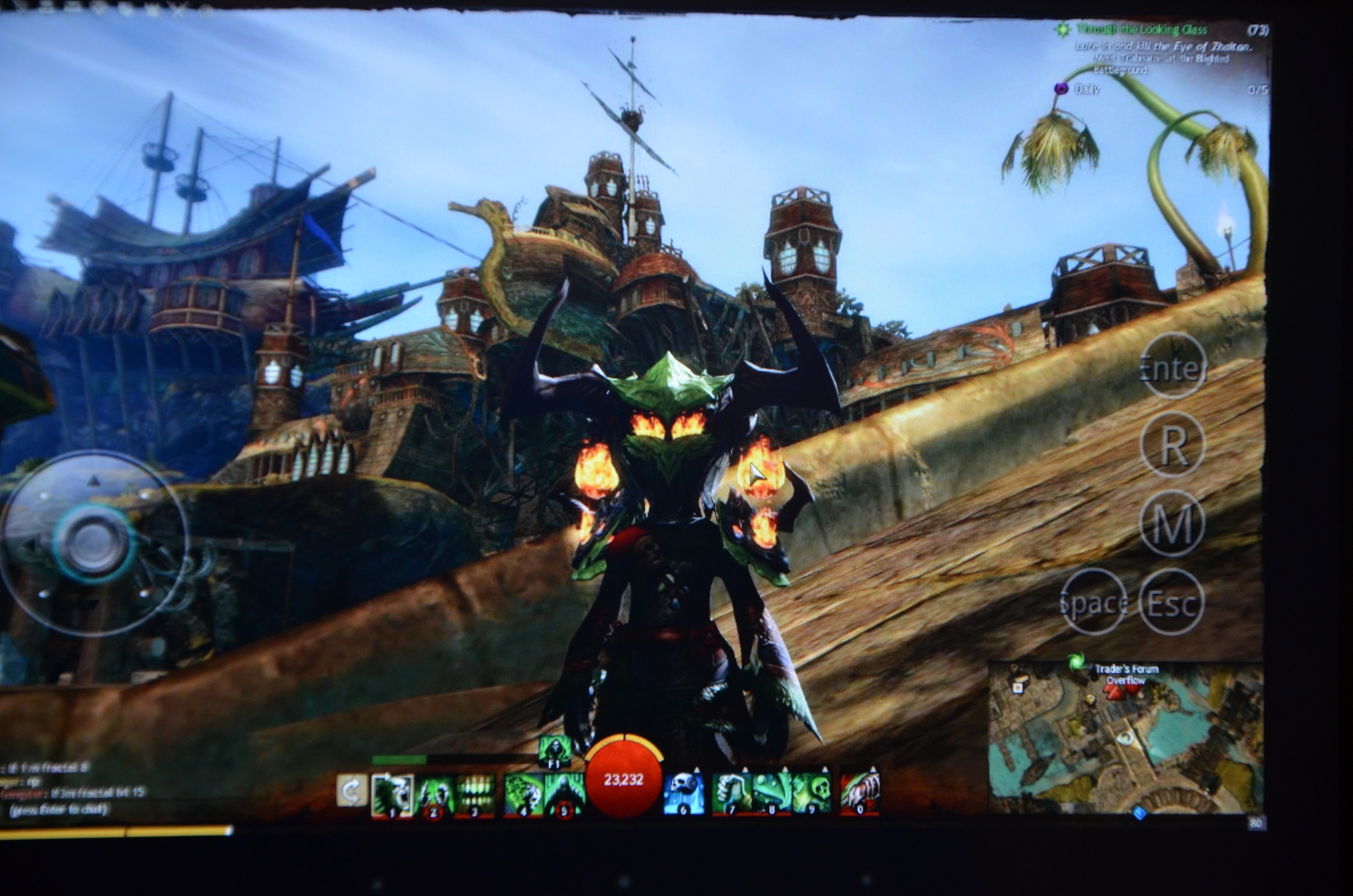
You can get a better idea of what I'm saying by looking at this |
|
image: |
|
https://technofail.files.wordpress.com/2013/03/dsc_0689.jpg |
|
- The transparent stick on the left is mappable to keyboard |
|
strokes, which makes it easy to customize. Also, the stick is by |
|
itself, instead of surrounded by small buttons. This makes it |
|
easier to accurately use the stick without having to look at it |
|
before using it. |
|
- The transparent buttons on the right are all customizeable |
|
keystrokes. While you can't change the size of the buttons, you |
|
can place them anywhere on the screen you'd like. They are |
|
independent of each other, and if you so wish, you can even |
|
overlap the buttons. |
|
- Any part of the screen that is not a button controls the |
|
screen like a trackpad. This means that the player can move his |
|
character with the joystick and use his right thumb and control |
|
the camera (which is mapped to mouse movement). Also, taps on |
|
the screen that aren't on a button register as a left click. So |
|
if his attack button is mapped to the left mouse click, he can |
|
click anywhere on the screen and attack and create buttons for |
|
other functions. |
|
I hope this is easy to understand. It would be wonderful if you |
|
could implement these functions. I really think Tablet Pro is a |
|
wonderful piece of software, but these extra touches and |
|
customizations can really make it THE go-to for touchscreen |
|
gaming controls. Thank you! |
|
#Post#: 231-------------------------------------------------- |
|
Re: Layout Editor for Gamepad + Combining keyboard, mouse, gamep |
|
ad elements |
|
By: justice Date: February 29, 2016, 7:08 pm |
|
--------------------------------------------------------- |
|
Hi Okta614 |
|
I apologize for the late reply. |
|
I completely understand what you mean and how your wanting the |
|
gaming experience to work. I've got a good amount of experience |
|
with splashtop and this registers with me. |
|
I'll be frequenting this post when we get a chance to focus on |
|
the game pad again. I'd like for it to be the best of the best |
|
and think these implemented features would get us there. So that |
|
you can appropriately plan, the game pad updates have to be |
|
scheduled after a few higher priority fixes (I'm a gamer so not |
|
thrilled but understand the reasons). |
|
I'll be very excited personally when we are able to implement |
|
some of your suggestions. =) |
|
I really appreciate you taking the time to give you feedback |
|
too, its really useful, really good feedback. |
|
***************************************************** |