|
Return Create A Forum - Home |
 |
--------------------------------------------------------- |
|
690 Enduro R |
 |
https://690enduro.createaforum.com |
|
--------------------------------------------------------- |
|
***************************************************** |
|
Return to: Airbox, Pipes, and Programmers |
|
***************************************************** |
|
#Post#: 288-------------------------------------------------- |
|
690 Enduro EFI -- Idiot's Guide link (part I) |
|
By: Rusty Shovel Date: February 13, 2014, 8:50 am |
|
--------------------------------------------------------- |
|
[quote author=dave_simpson link=topic=75.msg286#msg286 |
|
date=1392246101] |
|
http://www.advrider.com/forums/showthread.php?t=931664 |
|
[/quote] |
|
Thanks Dave, for the link. The original poster, El Ponkin at |
|
ADVrider, seems to have done his homework! For convenience's |
|
sake, I've included the text of his post here. If you want to |
|
thanks El Ponkin for donating his time to benefit fellow 690 |
|
Enduro owners, you can do so over at ADVrider |
|
( |
|
http://www.advrider.com/forums/index.php |
|
http://www.advrider.com/forums/index.php). |
|
Introduction |
|
My attempt here is to produce an idiot�s guide basically written |
|
by an idiot. |
|
I will placemat the first 10 posts in this thread so that I can |
|
put �Chapters� up as I finish them and keep all the facts on the |
|
first page of the thread. I have read numerous forums and |
|
threads to gather this info and my attempt here is to collate |
|
the information into one place in a logical sequence to save you |
|
the effort of searching, like I had too. I am not claiming to be |
|
an expert I am just acting as a conduit to gather the knowledge |
|
of multiple forums and posts into one place. |
|
Some information will be incomplete and some may be incorrect, |
|
the idea is I post it up and people can PM me corrections or |
|
additional information so it builds into a concise and accurate |
|
guide. |
|
If you have questions you can post them up, but make sure the |
|
answer is NOT already covered in the guide first and then the |
|
collective can come up with the answer and I can add it to the |
|
guide. |
|
Disclaimer |
|
Usual disclaimer in that any work you do on your own bike is at |
|
your own risk and if you are unsure you should be going to a |
|
dealer. |
|
If your bike is in warranty anything you do here will void your |
|
warranty. |
|
This guide is to help those who are mechanically efficient and |
|
computer literate who just want the facts in one place, the |
|
guide will not make you an engineer overnight. Don�t mess with |
|
your bike unless you are completely confident you know what you |
|
are doing and have fully researched the subject. |
|
Resources |
|
These are the major sources for the information I have produced. |
|
http://advrider.com/forums/showthread.php?t=685657 |
|
http://advrider.com/forums/showthread.php?t=685657 |
|
http://advrider.com/forums/showthread.php?t=666269 |
|
http://advrider.com/forums/showthread.php?t=666269 |
|
http://www.supermotojunkie.com/showthread.php?113690-FREE-KTM-690-Tuning-Softwa… |
|
http://www.supermotojunkie.com/showthread.php?113690-FREE-KTM-690-Tuning-Softwa… |
|
http://www.monomaniacs.nl/tnt/KTM-690/Stalling-and-throttle-issues |
|
http://www.monomaniacs.nl/tnt/KTM-690/Stalling-and-throttle-issues |
|
http://www.tuneecu.com/ |
|
http://www.tuneecu.com/ |
|
This final one is a site that has training material on the |
|
common OBDII Electronic Fuel Management Systems. |
|
Select Technical Articles from the LH Menu and then the relevant |
|
courses start from 31. |
|
http://www.autoshop101.com/ |
|
http://www.autoshop101.com/ |
|
Books: |
|
How to Tune And Modify Motorcycle Engine Management Systems � |
|
Tracy Martin |
|
__________________ |
|
http://www.jet-metal.com |
|
http://www.jet-metal.com |
|
******** |
|
Chapter 1 |
|
The basics about KTM 690 EFI |
|
KTM 690 models all have the same Keihin EFI system. This EFI |
|
system is different in a number of ways than on most - if not |
|
all - other bikes. It uses a 46mm single valve throttle body |
|
with two ECUs. One ECU controls the fuelling & ignition and the |
|
other controls the throttle valve through semi ride-by-wire. The |
|
ECUs interact with each other communicating over a CAN-BUS |
|
connection. The two cables from the throttle grip hook up to the |
|
throttle valve but the ECU has the ability to 'take over' if |
|
needed. Closing the throttle valve is 'hard wired' for safety |
|
reasons. Under normal conditions the throttle valve will follow |
|
the commands from the rider 1:1 but if the throttle commands get |
|
outside the working parameters of the engine, the ECU will take |
|
over controlling the throttle valve in a way that the engine |
|
will keep performing to its optimum. For instance; whacking the |
|
throttle wide open in a split second at 2500 RPM in 5th gear |
|
will normally stall the engine. This is when the throttle ECU |
|
takes over and opens the throttle as quickly as the engine will |
|
allow without stalling, a neat and sophisticated system that |
|
works really well. The fact that you never feel the ECU taking |
|
over when riding a 690 kind of shows how good it works. |
|
Basic Mapping |
|
Because of the setup with two ECUs the 'mapping' or 'fuel map' |
|
for a 690 also consists of two parts/files. A map (file) for the |
|
fuelling: ....FIMap.hex and a file for the throttle: |
|
....EPMap.hex. This has led to problems and confusion with both |
|
dealers and owners. The two parts of a fuel map belong together |
|
and are NOT interchangeable with other fuel maps. When updating |
|
or changing the fuel map it is critical that both files are |
|
downloaded to the bikes' ECUs. |
|
� EPT map: Determines the amount of throttle body opening |
|
relative to handlebar throttle input. Adjustment of this |
|
fly-by-wire throttle permits dramatic changes in response of the |
|
engine to throttle input. This system is what causes a lot of |
|
the twitchiness in the throttle. |
|
� FI map: Determines the amount of fuel delivered depending on |
|
engine load, RPM and throttle body input. This map may utilize |
|
the oxygen sensor or the SAI (secondary air intake) but these |
|
can be selected OFF. |
|
Later we will use a program called TuneECU to access these maps, |
|
the program allows us to access certain data from these maps but |
|
we do not see all of the functions. You will see that the EPT |
|
map takes longer to read than the FI map even though it appears |
|
to do less in the way of mapping tables and that is because |
|
there are other built in functions that TuneECU will not let us |
|
access. The modern engine management systems have monitoring |
|
circuits to make sure certain parameters are not exceeded and |
|
the result can be a �fuel-cut� signal being sent from the ECU, |
|
unfortunately there is very little information available about |
|
the effects of this and what parameters are monitored. |
|
The naming convention for map files indicates the year grouping |
|
that the map is applicable to, in this example the 11 indicates |
|
applicable to 2011 bikes only: |
|
� KM765EU11B0231FIMap.hex |
|
The models EFI systems differ and therefore are grouped |
|
according to year model. |
|
A. 2008-2010 � map code 08 |
|
B. 2011 � map code 11 |
|
C. 2012-2013 � map code 12 |
|
Mapsets available for different set ups. |
|
There are various KTM Map sets (EPT / FI) available for each of |
|
the different year groups as follows: |
|
� Standard � Standard air filter and catalytic converter |
|
exhaust. |
|
� Akrapovic � applicable to most performance pipes � runs lean |
|
at lower RPMs runs rich up higher. |
|
� EVO1 - applicable to most performance pipes with the addition |
|
of the opened up airbox lid. The best map from KTM and the best |
|
bike set up. |
|
� EVO2 - applicable to most performance pipes plus the opened up |
|
airbox lid plus performance camshaft. |
|
Each mapset actually contains submaps that look like excel |
|
spreadsheets that give different values for each combination of |
|
RPM,Throttle setting, pressure etc etc. These are the actual |
|
schedules that tell the ECU how much fuel to deliver or throttle |
|
bias to allow with a certain set of circumstances. |
|
FI Map Submaps: |
|
� F submap is the fuel mapping based on throttle position � it |
|
shows injection pulse width according to throttle plate opening@ |
|
given rpm |
|
� F Trim Adjustment for the fuel table F (in%) |
|
� L submap is the fuel mapping based manifold pressure � |
|
injection pulse width according to manifold absolute pressure |
|
(MAP) @ given rpm |
|
� I table is the ignition mapping |
|
� I Trim Correction tables for Ignition advance (I) in degrees. |
|
� F-L switch submap sets the threshold where the vacuum mapping |
|
goes over into the throttle mapping. |
|
EP Submaps |
|
� Throttle submap is the throttle by wire map, shows percentage |
|
throttle for each RPM thus affecting the sensitivity of the |
|
throttle, 100% is basically 1 to 1 ratio. |
|
There is a different F,L,I and Throttle submap for each number |
|
on the map select switch dial under your seat (0,1,2,3) If you |
|
are in position 2 on the dial then you will be using L1, F1, I1, |
|
and Throttle "performance" submaps. |
|
Obviously KTM have set these tables up to accommodate the |
|
different set ups of exhaust and air filter, but remember they |
|
have to meet stringent emission regulations and hence the tables |
|
all have calculations based on emission regs and not necessarily |
|
the optimum settings, later you will see how we can customise |
|
these individual submaps to fine tune for optimum performance. |
|
Map Select Switch under the seat |
|
The Map select switch under the seat has 10 positions these |
|
relate to the following settings: |
|
0 � Poor fuel |
|
1 � Soft |
|
2 � Performance |
|
3 � Standard (4-9 is the same) |
|
As discussed above these settings will change which submaps the |
|
ECU is using to control the engine. |
|
With some of the maps all of the "L" maps are the same, all of |
|
the "F" maps are the same and all of the "I" maps are the same |
|
(except for "I low octane fuel"). So in these cases, the only |
|
change to feel or performance that this switch does is to change |
|
the EP map which only affects the throttle sensitivity. |
|
******* |
|
Chapter 2 |
|
Diagnosing EFI |
|
Understand that these bikes have issues with fuel quality and |
|
operation of the fuel pump. |
|
The rear filler design and the minute fuel injector nozzle mean |
|
that crap can get in and stop the bike. In normal use the pump |
|
attracts a grey residue from the fuel tank material that will |
|
eventually block filters. Also the plumbing of the pump can get |
|
kinked lines and electrical connectors can work loose. So make |
|
sure that you eradicate all pump and injector issues before |
|
trying to diagnose an EFI fault. |
|
EFI systems are electrically controlled and driven, fault |
|
monitoring circuits therefore can only detect electrical faults |
|
and monitor for extremes i.e. open circuit or short circuit. If |
|
a sensor is misreading it will not be detected as a fault until |
|
its parameters go outside of set limits. If any sensors go |
|
outside limits you will get a flashing FI light and the KTM |
|
operators manual will be able to interpret the �blink� code |
|
which is kind of like �morse� code from the FI light blinking so |
|
many long and short blinks. |
|
If you have a mechanical fault, a sensor reading incorrectly or |
|
an incorrectly adjusted sensor there will be no warning. If you |
|
have a combination of a couple of faults it can get very hard to |
|
diagnose, particularly if you are dealership mechanic on a tight |
|
timeframe servicing a multitude of weaponry you simply won�t |
|
have the time to get fully up to speed on one particular model. |
|
My thoughts are that you as the owner need to become an expert. |
|
As KTM use a specific KTM diagnostics box to read and adjust the |
|
ECUs the price is inhibitive for the general home mechanic |
|
however some bright spark came up with a program called TuneECU. |
|
ECU Fault Monitoring |
|
The ECU monitors many items for electrical faults and is looking |
|
for them to be in a set range, if outside these values the ECU |
|
will give a fault. Several sensors are purely there to fine tune |
|
emissions to get the bike to pass the stringent European |
|
legislation and in most cases these systems are what upsets the |
|
ride- ability of the bike and they can be disabled without any |
|
issues. |
|
As there are so many sensors obviously the more you can disable |
|
then the less likely you will get a fault. KTM terminology is |
|
not consistent through their manuals so some names may vary |
|
depending on what manual you are looking at. |
|
� Crankshaft Position Sensor � Determines engine speed and Top |
|
Dead Centre position. |
|
� Throttle Position Sensor (Circuit A) � referred to as THAD in |
|
the KTM Manual, it is on the LH Side of throttle body and senses |
|
the throttle body butterfly valve position. |
|
� Accelerator Position Sensor � referred to as APAD in the KTM |
|
Manual, RH Side of throttle body and senses the cable input from |
|
the throttle. |
|
� Manifold Absolute Pressure Sensor � On top of the throttle |
|
body. The engine ECU uses barometric pressure to get ideal |
|
air/fuel mixture, thinner air = less fuel. 1013 hPa at sea level |
|
and 15 degrees Celsius air temperature is normal pressure. |
|
Barometric air pressure will vary from 960 to 1050 hPa. 988 hPa |
|
is normal with engine off, when you start the engine and rev it, |
|
more suction = less pressure. |
|
� Engine Coolant Temperature Sensor � changes fuel schedule |
|
during cold starting. Just below spark plug. |
|
� Intake Air Temperature Sensor � Located inside the airbox and |
|
can be damaged by oil contamination. NTC thermistor should be |
|
100k at 25 degrees C. |
|
� Ambient Air Pressure Sensor � Located under the instrument |
|
cluster behind the headlight, the sensing tube must be pointing |
|
down. |
|
� Rollover Sensor � Like a crash switch, just in behind the rear |
|
brake reservoir. |
|
� Lambda Sensor � Senses O2 in the exhaust to trim the fuel |
|
mixture a little, turned off with Performance Mapping. Located |
|
in the exhaust just below the radiator. Cold engine uses open |
|
loop and it switches to closed loop as soon as the lambda |
|
sensors reach their operating temperature, This might have |
|
something to do with the issue that few people have reported |
|
(the bike stalls after 10 s).ECU will use open loop operation in |
|
warm engine also whenever there is enough engine load |
|
(acceleration). The O2 sensor is only a narrow band sensor and |
|
therefore hasn�t got much authority over fuel flow, it can only |
|
make slight adjustments , more for emission control. |
|
� System Voltage � EFI systems are sensitive to volts and need a |
|
minimum voltage to work. |
|
� Sidestand switch � Can be removed and resistor put in its |
|
place. |
|
� Ignition Coil |
|
� Fuel Pump Controller |
|
� Lambda Sensor Heater � Heater in the O2 sensor. |
|
� Fuel Evaporation Valve � USA Models only |
|
� Secondary Air Valve � Commonly called SAI, turned off with |
|
Performance Mapping. LH Side mounted by the side of the airbox |
|
up near the radiator. |
|
� EPT Motor Drive Relay Permission |
|
� Motor Drive � this electrical motor drives the throttle body |
|
butterfly valve. |
|
� Motor Drive Hall Sensor |
|
� Motor Drive Voltage. |
|
� CAN Bus Communication � electronic communication between |
|
system components. |
|
� Gear position sensor |
|
According to the KTM tech, the 2011 bikes have different sensors |
|
than the previous 690's, so the resistance values maybe |
|
different. |
|
Don�ts with EFI |
|
As the EFI system is working on such minute voltage changes the |
|
electrical connections in the circuit are critical. |
|
� Don�t spray electrical connectors with WD40 as these circuits |
|
work on millivolts and WD40 will affect resistances. |
|
� Don�t use a jet wash near the sensors or throttle body as |
|
water will get in connectors and cause corrosion affecting |
|
resistances. |
|
****** |
|
Chapter 3 |
|
TuneECU |
|
TuneECU is a free program that can be used instead of the KTM |
|
Diagnostic tool. Please donate to the users if you find the |
|
program useful to help them keep the project going. |
|
The program will allow you to access diagnostics, read sensor |
|
values, set up sensors, read / reset fault codes and read / |
|
change mapping. |
|
EFI systems all follow a set format called OBDII so a standard |
|
cable is used just with an adapter lead to the KTM connector |
|
under the seat. |
|
It is highly important to buy a good quality cable from a |
|
reputable distributor as many have had problems with cheap ebay |
|
alternates. I bought mine from here: |
|
http://www.cjdesignsllc.com/. |
|
Use extra care when disconnecting the cable from your bike, by |
|
that I mean pull on the right part of the plug housing and not |
|
the cable/harness so as not to encourage it coming apart. |
|
So go to this website and read all about it and download and |
|
read the user guide to fully understand how it works. |
|
http://www.tuneecu.com/ |
|
http://www.tuneecu.com/ |
|
To set the system up on your laptop you will need to download |
|
the following: |
|
� The program |
|
� The drivers for the cable (these are specific to your computer |
|
operating system � Mine is Windows 7 with 64 bit � see note |
|
below ref determining whether 32 or 64 bit). |
|
� The maps |
|
The website has strict recommendations on how and where to store |
|
these files on your computer and making sure that the computer |
|
is not on the internet when first connecting the lead as you |
|
don�t want it to use any drivers from the internet, it must use |
|
the specified driver that you download. |
|
Once up to speed with TuneECU you will be able to read and save |
|
current maps and flash new ones. You will also be able to access |
|
the diagnostics page and read real time sensor values and set up |
|
your Throttle Position Sensor. |
|
Installing Drivers |
|
Installing the cable drivers is probably the most difficult part |
|
of the whole process as computers now automate this process and |
|
it can be hard to stop that automatic process to insist on |
|
installing your own specific drivers. |
|
These installation guides can help to overcome any issues |
|
depending on your operating system: |
|
http://www.ftdichip.com/Support/Documents/InstallGuides.htm |
|
http://www.ftdichip.com/Support/Documents/InstallGuides.htm |
|
How to determine whether your Windows 7 is 32 Bit or 64 Bit. |
|
Click the Start button, right-click Computer, and then click |
|
Properties. |
|
If "64-bit Operating System" is listed next to System type, |
|
you�re running the 64-bit version of Windows 7. |
|
If "32-bit Operating System" is listed next to System type, |
|
you�re running the 32-bit version of Windows 7. |
|
Download the corresponding Driver for your cable from here: |
|
http://www.ftdichip.com/Drivers/D2XX.htm |
|
http://www.ftdichip.com/Drivers/D2XX.htm |
|
Now watch the video |
|
http://www.youtube.com/watch?v=ctNjC_7HtjE |
|
http://www.youtube.com/watch?v=ctNjC_7HtjE |
|
http://www.youtube.com/watch?v=0hE2GnnqWWE |
|
http://www.youtube.com/watch?v=0hE2GnnqWWE |
|
How to see what Map is loaded on your bike |
|
When you are connected with the bike in tune ECU, in Map Edit, |
|
you will see ECU info in the top left corner, ECU serial, ECU |
|
map, checksum. You can toggle between the two ECUs to each of |
|
the two map names by clicking on the map name. |
|
Or |
|
When you are in the Map Edit, you press ECU - then Read Map - |
|
and here you can choose to read FI or EP map and the map code |
|
stands there to, just click cancel if you don�t want to read |
|
them to the computer. |
|
Working with Maps on the bike |
|
When you are connected with the bike in tune ECU you must |
|
understand that the display panel will tell you what map is |
|
loaded on the bike and you can �read� and �save� that map and |
|
�download� a new map but you cannot make �live� changes to the |
|
currently installed map. |
|
To explain it another way if you wanted to customise the current |
|
maps that are on the bike you would have to �read� them to |
|
display them in Tune ECU then make the changes in TuneECU before |
|
�downloading� them back to the bike. So you can see you only |
|
need to connect to the bike to �read�, �save� or �download�. All |
|
work to be done to change or customise mapping can be done in |
|
TuneECU whilst disconnected from the bike. |
|
#Post#: 289-------------------------------------------------- |
|
690 Enduro EFI -- Idiot's Guide link (part II) |
|
By: Rusty Shovel Date: February 13, 2014, 9:07 am |
|
--------------------------------------------------------- |
|
Chapter 4 |
|
Remapping |
|
WARNINGS � READ THESE OR ELSE: |
|
Make sure that you have a decent charge in your battery or hook |
|
it up to a tender/charger. Reading maps from your bike takes |
|
about 45min and re-writing, re-mapping, (downloading, flashing) |
|
takes just about few minutes. |
|
If the power drops out or computer trips up during this process |
|
the ECU will freeze, if this happens you will need to carefully |
|
read the TuneECU guide to recover the ECU. This is the risky |
|
side of this operation so make sure you have back up for your |
|
bike battery and that your laptop isn�t going to run out half |
|
way through either. |
|
Don�t have any other EFI Programs running on your computer |
|
whilst connected to the bike as some can cause damage. Only use |
|
the TuneECU program whilst connected. |
|
Procedure: |
|
1. As you cannot turn off the headlight you must remove the |
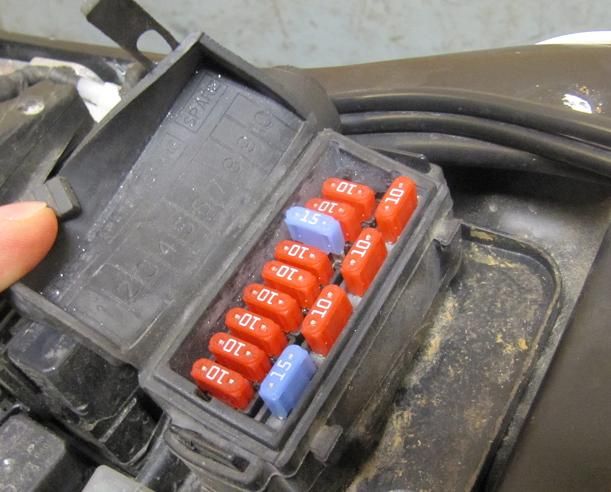
|
headlight fuse in order to save battery charge (15A, blue) |
|
http://i168.photobucket.com/albums/u195/Elponkin/TuneECU/1_zps0c90e43b.jpg |
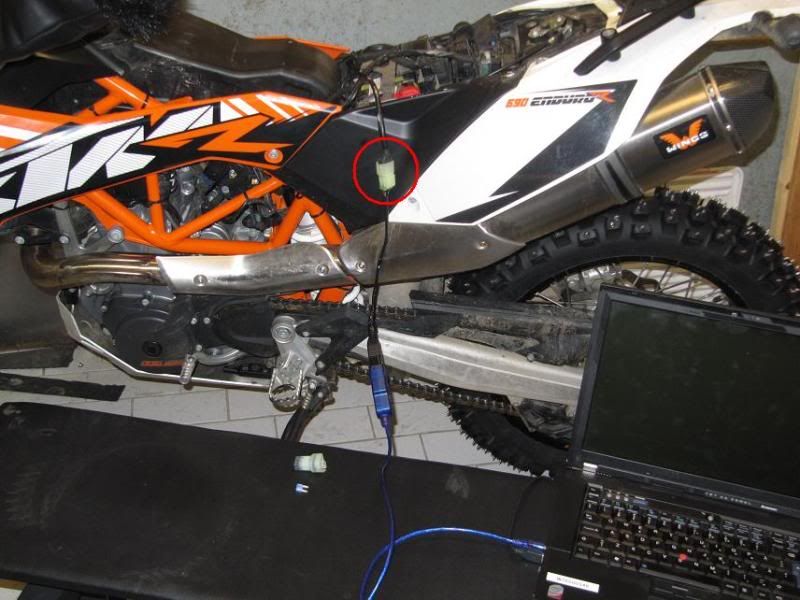
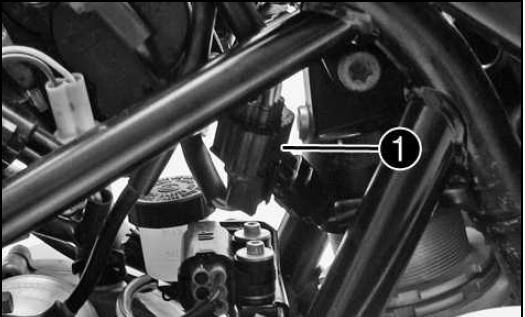
|
2. Locate the ECU test connection and carefully remove the |
|
blanking plug. Attach the cable to your bike and turn the |
|
ignition ON. (You can connect the cables wrong, check out the |
|
pins and make sure you orientate the plug correctly before |
|
pushing it in) |
|
http://i168.photobucket.com/albums/u195/Elponkin/TuneECU/2_zps5f12da31.jpg |
|
3. Start up the TuneECU software. |
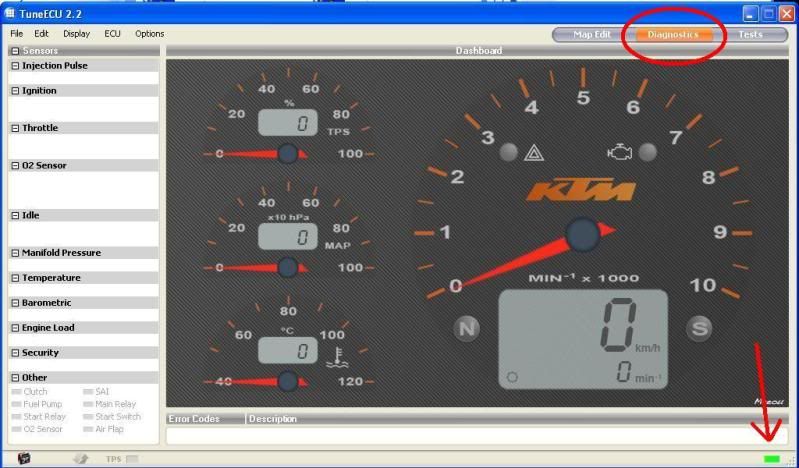
|
Three views are possible and can be selected in the top |
|
right-hand-corner. |
|
Maps - allows view and editing of maps |
|
Diagnostics - Allow you to see a wide variety of parameters the |
|
ECU is monitoring such as barometric pressure, oil temp, ambient |
|
temp, engine load, throttle voltage. |
|
Tests - Allows you to perform several tests on the bike via the |
|
ECU |
|
NOTE: When opening the program for the first time the opening |
|
screen is set to Triumph by default, it will change to KTM upon |
|
connection or loading a map. |
|
NOTE: As a default, it should connect to your bike. If it |
|
doesn't, select the ECU menu and click connect. You will see in |
|
the �Options� menu a selection for �Auto Connect� and you can |
|
select this if you like, if working in TuneECU whilst |
|
disconnected from the bike it is best to uncheck this to stop |
|
the annoying pop up telling you it can�t connect. |
|
Within 30 seconds, a little rectangle will blink in the lower |
|
right-hand-corner of the application. Initially it will be red |
|
when sensing the connection and turn to green once a connection |
|
is established. |
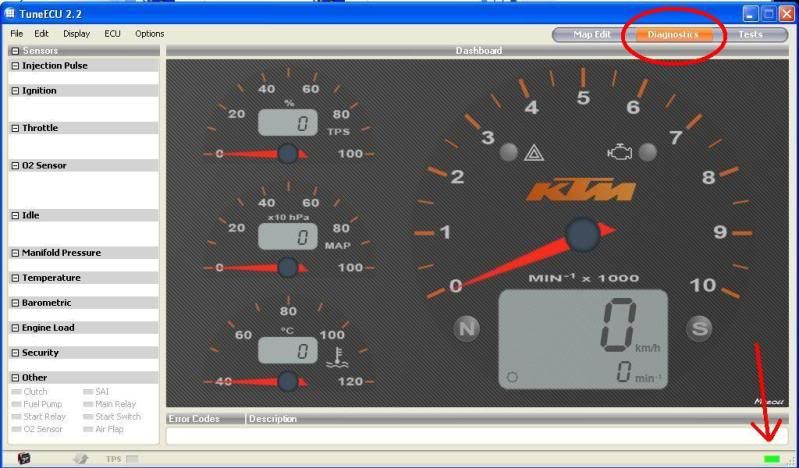
|
http://i168.photobucket.com/albums/u195/Elponkin/TuneECU/3_zpsa5c08408.jpg |
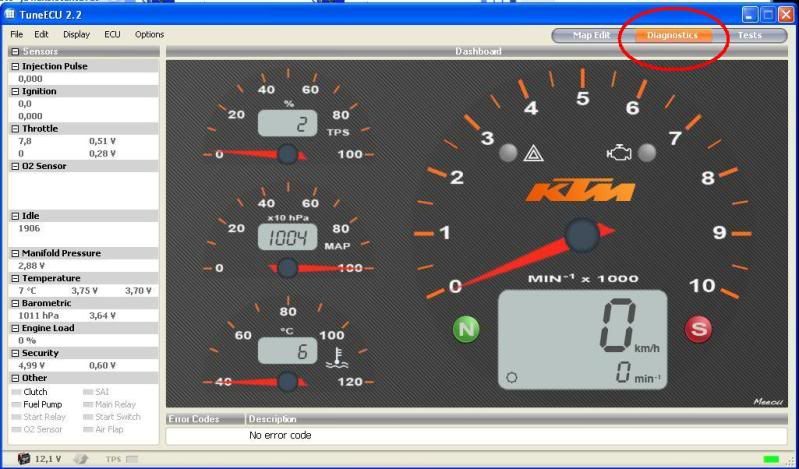
|
4. After a while TuneECU has read the sensor readings. |
|
http://i168.photobucket.com/albums/u195/Elponkin/TuneECU/4_zps7f709fc7.jpg |
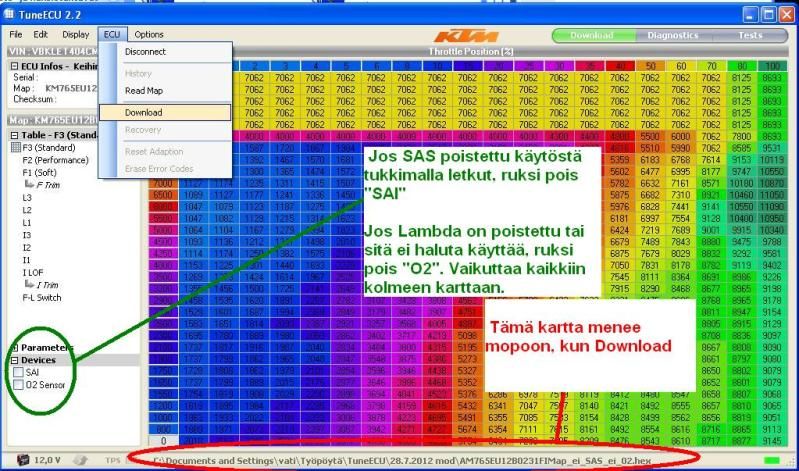
|
5. Move to the "Download" page. Reading your currently installed |
|
map and saving it is recommended as a fail-safe feature at least |
|
if your recent map is not available at Tune ECU site. Just make |
|
a backup. |
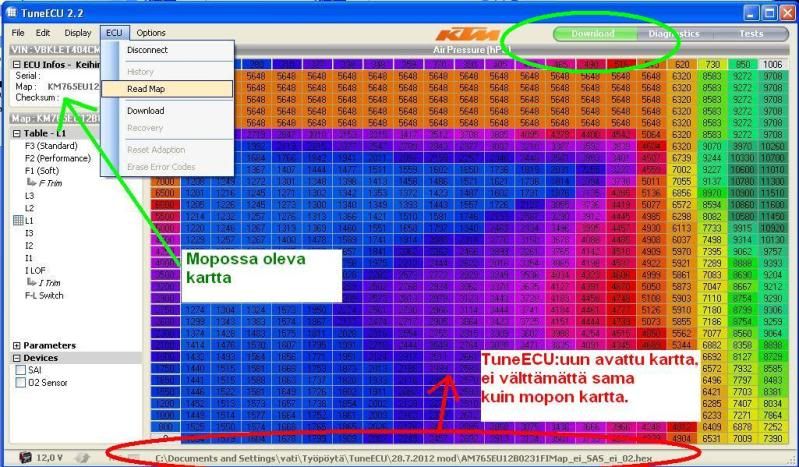
|
The Green arrow below shows the ECU info and this will indicate |
|
what map is currently loaded in the bike, you can click on the |
|
Map number and it will toggle between the EP map number and the |
|
FI map number. |
|
NOTE: TuneECU does not display the Maps currently loaded on the |
|
bike in the tables, the table displayed is the last map that you |
|
chose to �open� or �read� it is not looking �live� at the map |
|
that is on the bike. You can see the Red arrow shows the |
|
computer address of the map that is currently being displayed. |
|
To display the map currently installed in the bike you must |
|
first �Read� the map. To do this from the ECU menu select Read. |
|
http://i168.photobucket.com/albums/u195/Elponkin/TuneECU/5_zps369cde90.jpg |
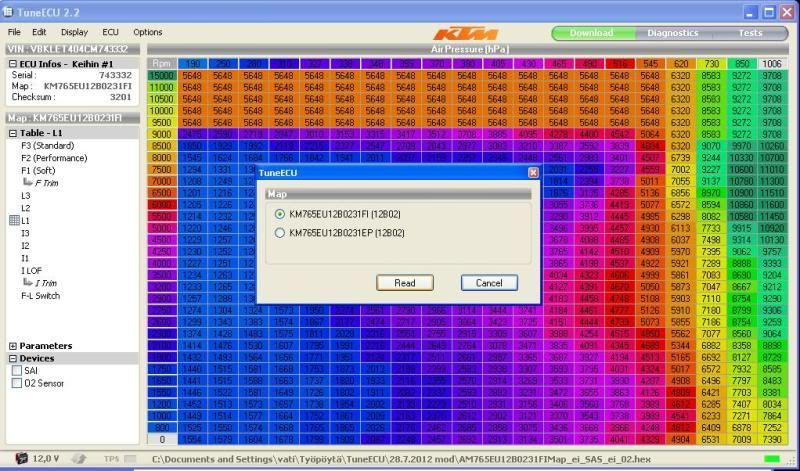
|
6. TuneECU software will ask which map you want to Read. Select |
|
the first map and select Read. TuneECU will then commence |
|
reading the map and copying it to the tables. A green progress |
|
bar will appear at the bottom of the tables which will indicate |
|
the percentage read. |
|
NOTE: The FI map takes about 10 mins but the EP map takes about |
|
30 mins. |
|
BE PATIENT AND DON�T MESS WITH ANYTHING. |
|
http://i168.photobucket.com/albums/u195/Elponkin/TuneECU/6_zpsca23972c.jpg |
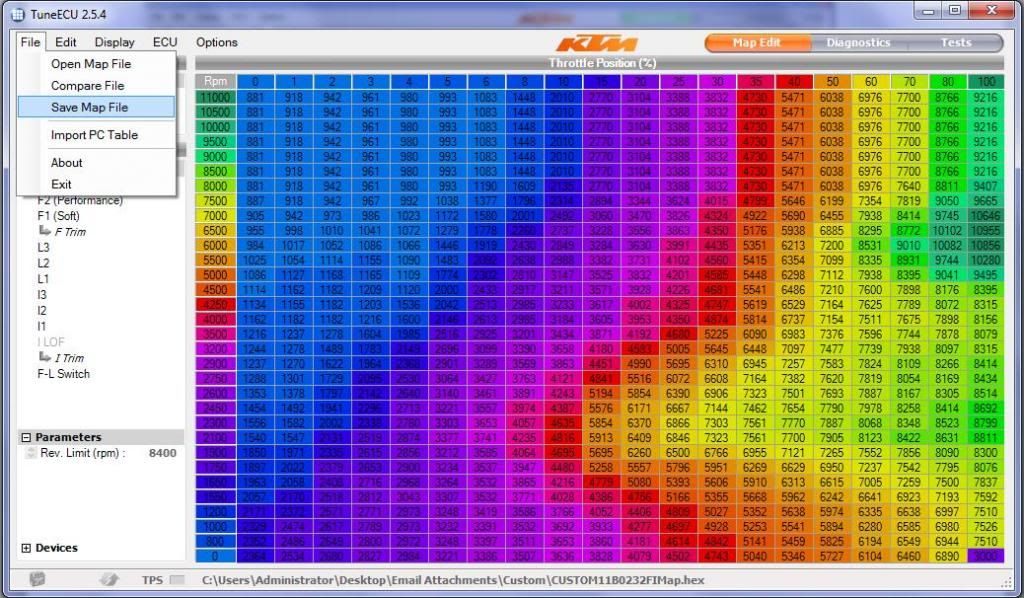
|
7. After the Map has finished being read you must then save the |
|
map to your laptop so you keep a copy of what was originally |
|
installed in case you have a problem. Select the File Menu and |
|
click on Save Map File. |
|
http://i168.photobucket.com/albums/u195/Elponkin/TuneECU/7_zps714c9acc.jpg |
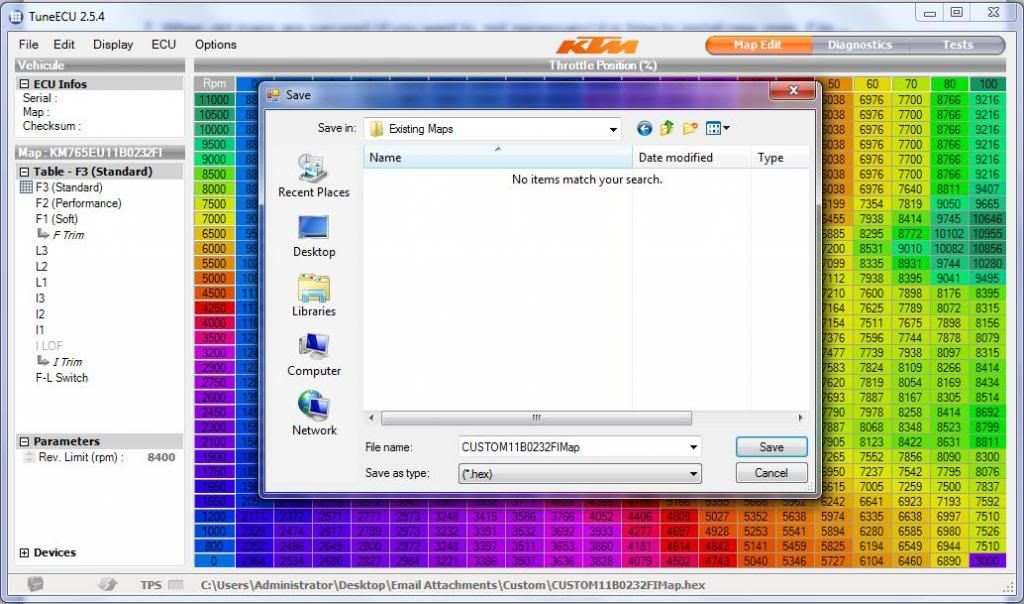
|
8. Create a folder for the existing maps and save to that |
|
folder. |
|
http://i168.photobucket.com/albums/u195/Elponkin/TuneECU/8_zps0979eb9d.jpg |
|
9. Now repeat the �read and save� process for the EP Map. |
|
10. Now the old maps are secured it is time to install new ones. |
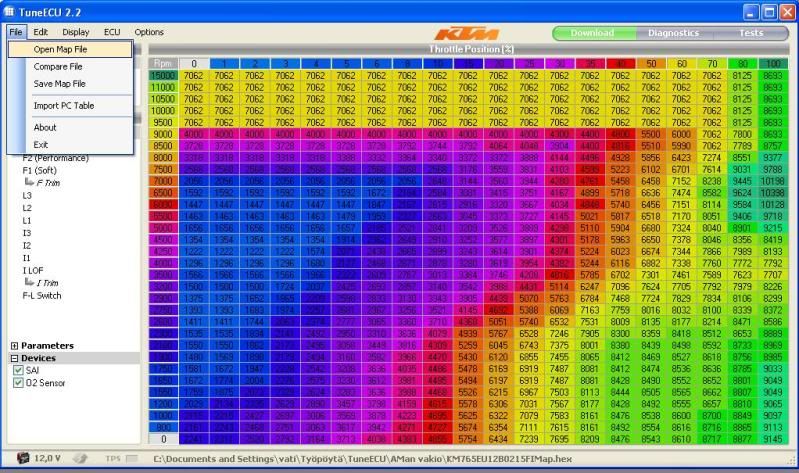
|
Select File Menu and click on Open Map File. |
|
http://i168.photobucket.com/albums/u195/Elponkin/TuneECU/9_zpsf2939b92.jpg |
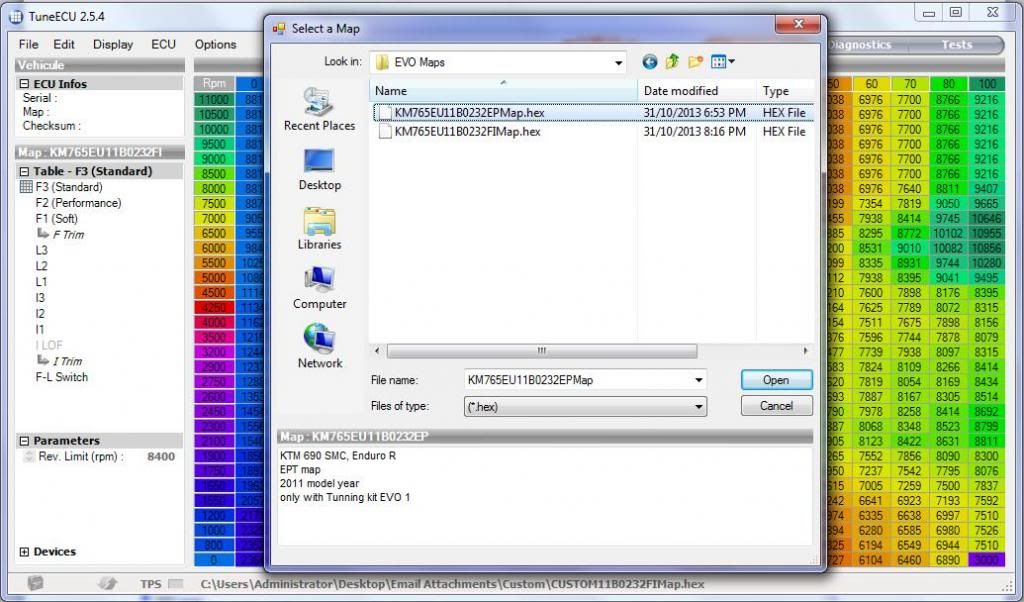
|
11. Open the map that you're going to install starting with the |
|
EP Map. In this case we are installing the EVO1 maps for a 2011 |
|
bike. |
|
http://i168.photobucket.com/albums/u195/Elponkin/TuneECU/9a_zps1a1376fd.jpg |
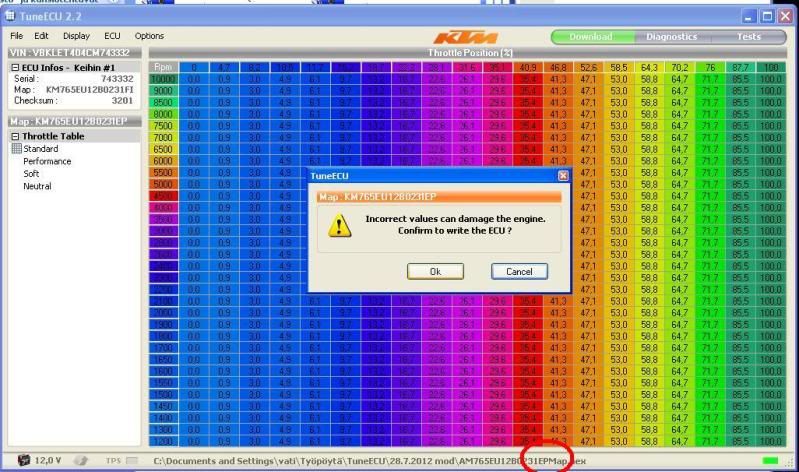
|
12. Once you have opened your new map it will be displayed in |
|
the tables. To Install the map on the bike select the ECU menu |
|
and click on Download. A warning will pop up explaining the |
|
dangers of loading an incorrect map, this is a standard warning |
|
that will always show and acts as a timely reminder to ensure |
|
you have selected the correct map. Click Ok and the download to |
|
the bike will commence. It only takes a couple of minutes and |
|
again you will see the progress bar as this happens. |
|
NOTE: The Red circle in the screenshot shows the path to the map |
|
file which is going to be downloaded. |
|
http://i168.photobucket.com/albums/u195/Elponkin/TuneECU/9b_zpsa7a0278d.jpg |
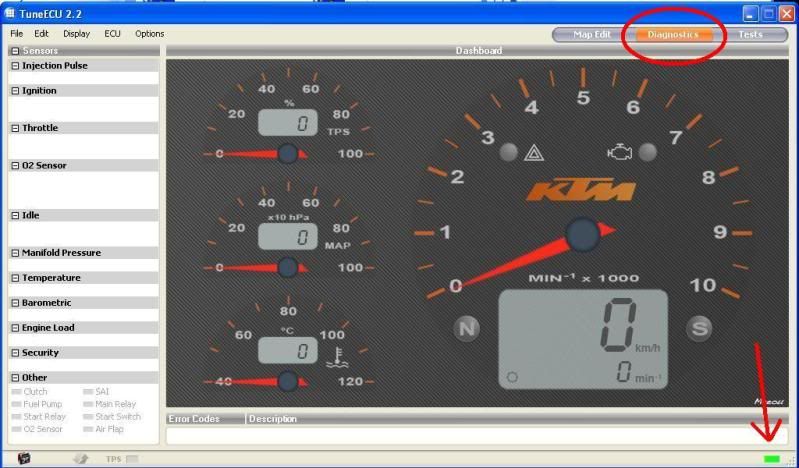
|
13. After the EP map install you must do a Throttle Calibration. |
|
The bike remains hooked up through this process so you can |
|
monitor the throttle calibration with TuneECU. Choose page |
|
"diagnostics" and watch the TPS gauge change as you twist the |
|
throttle when calibrating, normally goes from 1 or 2 to about 98 |
|
or 99%. |
|
. |
|
Carry out as follows: |
|
Turn the ignition off for 10 secs |
|
Turn ignition back on and Twist the throttle grip slowly to full |
|
open and then slowly to full close and then turn the ignition |
|
back off. |
|
Turn the ignition back on and make sure TuneECU reconnects |
|
automatically and you get a green bar again in the bottom RH |
|
corner. |
|
http://i168.photobucket.com/albums/u195/Elponkin/TuneECU/9c_zps4085de54.jpg |
|
14. Repeat items 12 and 13 to install the FI map with the |
|
following addition: |
|
Once you have opened the FI map you need to make sure you have |
|
the right boxes ticked on or off under the �Devices� heading. If |
|
you have SAS plugged, you should uncheck the SAI box. If you |
|
have the O2 lambda sensor removed you should uncheck the O2 box. |
|
If they are still fitted you can decide whether to just |
|
electrically disable them or not just by unchecking each box, I |
|
would recommend they be disabled for smoother running if you do |
|
not have the standard exhaust still fitted. |
|
NOTE: as long as these checkboxes are unchecked i.e. disabled |
|
the sensors can be removed WITHOUT having to fit a slave |
|
resistor and there will be no FI warnings and map loading will |
|
work fine with them not fitted. |
|
Now download the FI map to the bike as we did before for the EP |
|
map. |
|
NOTE: The Red circle in the screenshot below shows the path to |
|
the map file which is going to be downloaded. |
|
http://i168.photobucket.com/albums/u195/Elponkin/TuneECU/9d_zpsbd117666.jpg |
|
15. After the FI map is installed you must do the 15 min |
|
�adaptation� run as follows: |
|
NOTE: The engine must be stone cold and throughout the process |
|
do not touch the throttle. Leave the bike connected to the |
|
laptop but make sure the cabling is away from the exhaust heat. |
|
Start the engine and let it run for 15 min. |
|
After 15 mins Kill the engine with the ignition key. |
|
You can monitor the 15 min adaptation run with TuneECU. Choose |
|
page "diagnostics" and watch the IAT and Coolant Temp rise when |
|
idling and the fan kicking in and out to control water temp. |
|
16. Once complete and with the ignition off, shutdown the |
|
TuneECU program and disconnect the cable. |
|
Remember to reinstall the blanking cap on the ECU connector and |
|
then restow it out of harms way. Refit the headlight fuse and |
|
refit the seat. Job done. |
|
http://i168.photobucket.com/albums/u195/Elponkin/TuneECU/9e_zpsaf0bf724.jpg |
|
#Post#: 290-------------------------------------------------- |
|
690 Enduro EFI -- Idiot's Guide link (part III) |
|
By: Rusty Shovel Date: February 13, 2014, 9:14 am |
|
--------------------------------------------------------- |
|
Chapter 5 |
|
Tune ECU Experimentation |
|
For a more in-depth look into customising maps check out this |
|
link |
|
http://advrider.com/forums/showthread.php?t=666269 |
|
http://advrider.com/forums/showthread.php?t=666269 |
|
Warning. |
|
When customising maps you can seriously damage your engine. It |
|
is best to have the mapping customised by an expert with the |
|
bike on a dyno. |
|
Customising Maps |
|
http://Customising Maps |
|
The F map is usable at high engine load when MAP (Manifold Air |
|
Pressure) is close to atmosphere or there is just a little under |
|
pressure. |
|
The L map is usable at low engine load, when there is much under |
|
pressure. |
|
When you are cruising at suburban speeds the throttle plate is |
|
almost completely shut. The pressure in the manifold is very |
|
low. L-map starts from 190 hPa, which is approx. 0,19 * |
|
atmospheric pressure. KTM 690 fuel pressure is 3,5 bar or 3500 |
|
hPa. The amount of fuel being delivered to the manifold is |
|
defined by 2 things; pulse width (injector open) + pressure |
|
difference. Injecting the same, let's say 8000 �s, at 0,2 bar |
|
MAP compared to 0,9 bar MAP makes 19% difference in the amount |
|
of fuel injected. That makes a lot in terms of Air Fuel Ratio |
|
(AFR). Therefore, you need to match the pulse width to manifold |
|
(under) pressure. |
|
The F-L switch map controls the point at which fuel scheduling |
|
goes from the L map to the F Map. The F-L map can be tweaked to |
|
read 10,10,0,0,0,0,0 and this means that the bike's ECU uses |
|
almost all the time the F map. 10 means 10% throttle as a limit |
|
to change using F map. At higher revs (1800 and up) the limit is |
|
0%. So the bike is using the F map practically all the time. |
|
The L map is more accurate at low engine load. That's where the |
|
jerky ride and stalling gremlin lives. L map has also the |
|
ability to adapt to changed airflow conditions like clogged air |
|
filter or changing atmospheric pressure (high elevation, |
|
barometric low). |
|
In 690cc KTM 690 bikes (2012-) there is no need to tweak the F-L |
|
switch map. |
|
The F-maps can be edited in two different ways: |
|
� If you want to make a change that will be applied to all the |
|
F-maps you can select "Edit" from the drop-down menu and click |
|
the option to "use F-trim for all F tables". Then you can select |
|
the F-trim icon in the left hand column and then change all the |
|
"0s" to "4s". Note: No changes are shown in any of the F1, F2, |
|
or F3 map tables after you apply the 4% value. |
|
� If you want to make changes to each individual map, first make |
|
sure "apply F-trim value to all maps" is NOT selected. Then you |
|
select a map you want to edit and highlight all the cells. Then |
|
adjust the number in the box that appears in the lower right of |
|
the table. Hit enter and the map values in the table will |
|
update. Select the next F-map and repeat. |
|
The L-maps are changed the same way you change the F-maps |
|
individually. You select a map and then highlight all the cells |
|
and adjust the number in the box that appears in the lower right |
|
of the table. Hit enter and the map values in the table will |
|
update. Select the next L-map and repeat. |
|
Always work on a renamed copy of the file and don't forget to |
|
save it. |
|
Check out this link to the full process with pics: |
|
http://advrider.com/forums/showpost.php?p=15358449&postcount=13 |
|
http://advrider.com/forums/showpost.php?p=15358449&postcount=13 |
|
When you really get into it then read this forum and join the |
|
elite: |
|
http://advrider.com/forums/showthread.php?t=685657&page=3 |
|
http://advrider.com/forums/showthread.php?t=685657&page=3 |
|
********* |
|
Chapter 6 |
|
KTM 690 - Stalling and throttle issues |
|
Sourced from: |
|
http://www.monomaniacs.nl/tnt/KTM-690/Stalling-and-throttle-issues |
|
http://www.monomaniacs.nl/tnt/KTM-690/Stalling-and-throttle-issues |
|
A lot of 690 owners complain about stalling and/or a jerky |
|
throttle response. While there are differences between |
|
individual bikes (and their owners...), there seems to be no |
|
pattern in models or production years. Some bikes suffer more |
|
from stalling and throttle glitches than others. Most don't at |
|
all or only occasionally. But these niggles are usually easy to |
|
solve! |
|
The fact that KTM 690s are a bit more sensitive to stalling |
|
and/or throttle issues is down to two important factors; |
|
performance and emission & noise regs. The 690 is one of the |
|
strongest 4-stroke singles on the market today, this means a |
|
relatively high state of tune, big valves, big ports, big |
|
throttle body, high compression, low rotating mass etc. But the |
|
690 also has to meet the ever tougher regulations for emissions |
|
and noise. Power & performance do not go hand-in-hand with noise |
|
& emissions regs very well, especially not with a big single. |
|
The Lambda sensor controlled EFI keeps the engine on a |
|
super-lean mixture, catalytic converter(s), Secondary Air |
|
System, throttle restriction in 2nd & 3rd gear are all there to |
|
make it pass the murdering emission & noise regs. They do not |
|
help the engine... they do exactly the opposite. The high |
|
performance concept & design of the 690s combined with all the |
|
environmental measures makes them more sensitive to the right |
|
setup and adjustments. |
|
But we all want that performance so stop moaning and deal with |
|
it properly. 95% of the stalling and throttle issues are easily |
|
solved and are usually only down to proper service and dealer |
|
knowledge. |
|
These are the steps to follow to kill throttle gremlins: |
|
1.Throttle calibration (All) |
|
2.Idle reset procedure (All) |
|
3.Throttle sensor check/adjustment (Values change depending on |
|
year model) |
|
4.Idle CO check/adjustment |
|
1. Throttle calibration |
|
The simplest one. This re-calibrates the start & stop position |
|
of the throttle grip. Turn the ignition on but don't start. Wait |
|
for the tacho needle to return to zero. Then turn the throttle |
|
grip gradually from close to open and back from open to closed. |
|
Don't let it snap shut. Turn the ignition off, done. |
|
2. Idle reset procedure |
|
The 'famous' 15 minute idle reset procedure. This resets the |
|
adaptive base values of the ECU. It won't transform the bike but |
|
it can make a worthwhile improvement. It is very important that |
|
the engine is stone cold. One or two hours after riding is not |
|
enough! Do this after the bike has been off for a full night or |
|
day. Start the engine and let it idle for 15 minutes without |
|
touching anything. After 15 minutes, switch the engine off with |
|
the ignition key. Done. During this procedure you won't see or |
|
hear anything happening besides the idling and (probably) the |
|
fan. Don't worry, the reset is done. Besides after certain |
|
maintenance or parts replacement, you could consider doing it |
|
twice a year with the turning of the seasons. A reset for the |
|
colder autumn & winter period and one time for warmer conditions |
|
during spring & summer. This is not mandatory or needed and |
|
don't expect miracles. |
|
3. Throttle sensor check/adjustment |
|
This requires a KTM diagnostics tool hooked up to the bike or |
|
use TuneECU as described before. There are two throttle sensors |
|
on the throttle body (where the carb used to be...). On the left |
|
hand side is the sensor controlled by the ECU. This one is used |
|
when the ECU takes over the control of the throttle valve from |
|
the rider (ride by wire with data from the throttle map). On the |
|
right hand side is the sensor connected to the throttle cables |
|
coming from the throttle grip. This is the one that makes you |
|
think you're in control. :-) Both sensors interact with each |
|
other and each has its own base adjustment. It's not difficult |
|
to understand that these are important. The abbreviations in the |
|
maintenance & repair manual for these base adjustments are |
|
'THAD' and 'APAD'. The procedure is pretty straightforward but |
|
precise. It shouldn't take longer than 20 minutes or so. After |
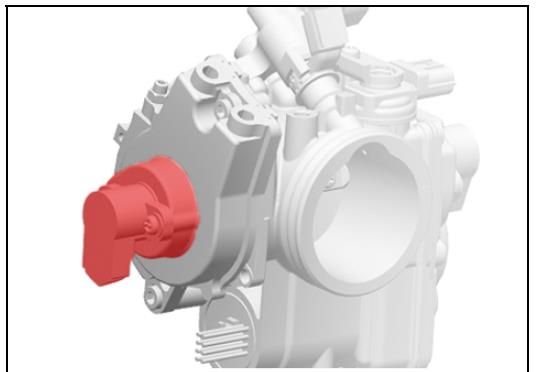
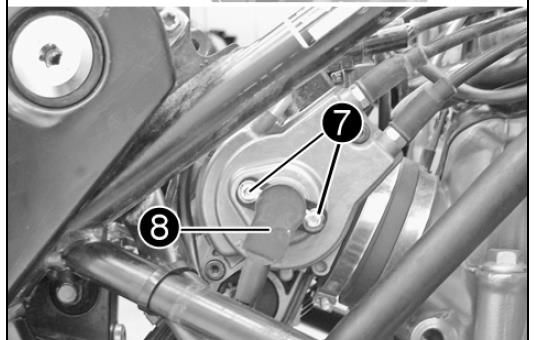
|
adjustment it makes sense to do a �Throttle Calibration� as per |
|
step 1 above. On the left side is the TPS "THAD" basic setting |
|
is 0.50 - 0.54v this is the throttle position for the ECU |
|
throttle butterfly closed with your finger. On the right side is |
|
the TPS "APAD" basic setting is 0.70 - 0.74v this is the |
|
throttle grip position sensor These settings are from the |
|
2008-2010 manuals (2011 is different and I haven�t found the |
|
values yet). Be aware there is a plastic tag on the TPS driving |
|
the butterfly so be careful not to break it off by being to |
|
rough. |
|
4. Idle & Load CO check/adjustment |
|
This requires a KTM diagnostics tool hooked up to the bike or |
|
use TuneECU as described later. There is some control over the |
|
idle & load mixture through adjustment of the CO targets from |
|
the ECU. This is within a limited bandwith but enough to iron |
|
out idle or fueling glitches. Adjustments are made by up & down |
|
mouse-clicks with real time bar graphs on the screen that show |
|
what happens. Very easy. Only small changes at a time should be |
|
made. The effect of changes to the idle CO take a while to show |
|
in the graphs. The target for load CO (riding) is usually set at |
|
1.000. This is Lamda 1 and corresponds to an air/fuel mixture of |
|
1:14.7. Adjustment of this value goes in small steps of 0.008 |
|
but has a clear effect on the mixture throughout the rev range. |
|
Only one or two steps is enough. Not more because the mixture is |
|
likely to become too rich or lean. So if the mixture needs to be |
|
a little richer (probably) this would be 1.008 or 1.016. Ideally |
|
this should be done on a dyno but minor adjustments like this |
|
can be done by 'set & ride' too. |
|
After these 4 steps, 99% of all idle and throttle glitches will |
|
be solved. Most already after steps 1 to 3. If not, something |
|
else is really wrong or malfunctioning but this is rarely the |
|
case. If so, there is a big chance the cause will show up on the |
|
diagnostics page of TuneECU in the error message log. |
|
Idle Figures |
|
2200 idle rpm when cold is normal, 1650 when hot is normal idle |
|
rpm. |
|
#Post#: 291-------------------------------------------------- |
|
690 Enduro EFI -- Idiot's Guide link (part IV) |
|
By: Rusty Shovel Date: February 13, 2014, 9:22 am |
|
--------------------------------------------------------- |
|
Chapter 7 |
|
Setting up the Throttle sensor. |
|
Sourced from: |
|
http://www.supermotojunkie.com/showthread.php?115864-KTM-690-fix-staling-proble… |
|
http://www.supermotojunkie.com/showthread.php?115864-KTM-690-fix-staling-proble… |
|
KTM 690 fix stalling problem using TuneECU |
|
I spent a week trying to get bike not to stall after loading any |
|
kind of map with after market slip-on exhaust. This is a guide |
|
on how to do it yourself in much less time. |
|
Symptoms: |
|
1. Bike stalls after start up when cold. You need to fire it up |
|
every 10 or 30 sec. You can hear it idle irregular and you can |
|
even know when it�s going to stall just by listening to the |
|
engine... |
|
2. Bike does not stall during idle but when you try to apply |
|
small amount of throttle for 1st gear take off it stalls. During |
|
idle try to open throttle by very small amounts Very slowly and |
|
you can hear engine running irregular or even stall. |
|
Cause of the problem is in the two throttle sensors on each side |
|
of keihin throttle body. For the ECU to know how much throttle |
|
is opened, its sensors need to be reading the same voltage. If |
|
sensors are not aligned the ECU will think it has throttle |
|
opening of 3% while actual opening would be 5% or more, it can |
|
also go the other way around. Also if sensors are not aligned |
|
the ECU will not pickup small throttle openings that you apply |
|
around idle. |
|
To fix this you need to use the TuneECU program, the voltage |
|
figures particular to your year model and some tools. To be able |
|
to unscrew throttle sensors you will need a torx t20 bit that |
|
has a hole in middle. |
|
The procedure on how to adjust these 2 sensors can also be found |
|
in the KTM Repair manual from pages 165-169. I also advise to |
|
read it twice. In manual this procedure is explained using the |
|
KTM diagnostic tool. You don�t need the tool to adjust anything |
|
you just need it to read voltages so therefore you can use |
|
TuneECU instead as it will read and show the voltages. |
|
Try to read all of the TuneECU guides to get familiar on how to |
|
use this software before u start to adjust sensors. |
|
2008-2010 Year Models Procedure: |
|
Remember these wise words �If it isn�t broke don�t fix it�, only |
|
do this procedure if you have a problem and only then if you are |
|
absolutely sure you know what you are doing. I believe KTM |
|
change the throttle body as a complete assembly so if you bugger |
|
it up it will be expensive. |
|
Remember to disconnect the stepper motor before pushing with |
|
finger. |
|
These values are for 2008-2010 Models ONLY I do not have the |
|
figures or procedure for 2011 onwards yet. |
|
Do this while engine is as cold as possible. Always consult |
|
manual first before doing any of this. I am not explaining how |
|
to turn every bolt around and I am using nuts and connector |
|
names and numbers as in the KTM repair manual. |
|
1. Take off the seat, body fairing and air box (don�t forget to |
|
unplug air temp sensor before you remove the air box), |
|
2. Unplug the motor drive connector that�s under the keihin |
|
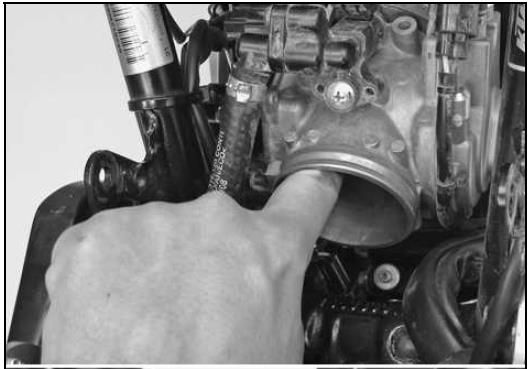
throttle body on the left side of the bike (connector DR1 from |
|
manual). There are 2 connectors and DR1 is one that has more |
|
than 3 wires. You will know if you unplug the wrong one by |
|
hearing the drive motor working when you use your finger to |
|
fully close throttle valve (see repair manual on how to close it |
|
with your finger). |
|
http://i168.photobucket.com/albums/u195/Elponkin/TuneECU/a_zps3ce9294d.jpg |
|
3. Now connect TuneECU to the bike and go to diagnostic menu. |
|
When its communicating with the bikes ECU you will see most of |
|
bikes sensors values appear in Diagnostic menu. |
|
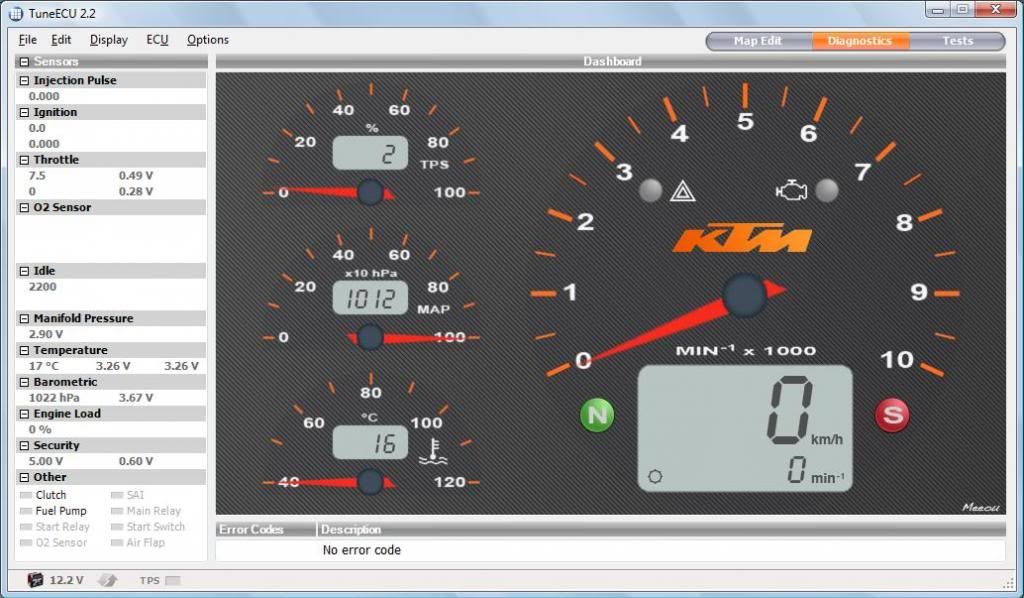
http://i168.photobucket.com/albums/u195/Elponkin/TuneECU/b_zpsc496ab7b.jpg |
|
What you need is to be able to see is the 2 voltage values under |
|
the "Throttle" menu on the left side of the TuneECU Diagnostic |
|
window. Both upper and lower voltage should be round 0.70-0.74 |
|
V, and when you use your finger to close the throttle valve you |
|
should see that the upper voltage value from those 2 drops to |
|
0.50-0.54V. Now if ANY of these voltages is only 0.1V off from |
|
what it should be you need to adjust all 3 readings. |
|
NOTE: Apologies for the screenshot � As it is a shot from my |
|
2011 the figures are obviously not the same as the 2008-2010 |
|
model that we are discussing. |
|
4. Check that the upper voltage value drops to 0.50-0.54V when |
|
you press the throttle valve to the closed position with your |
|
finger. Do this gently as there is a plastic tang that can be |
|
damaged. This is referred to in the manual as the Throttle |
|
Position Sensor Circuit A Basic Position � Voltage �THAD�. |
|
http://i168.photobucket.com/albums/u195/Elponkin/TuneECU/c_zps8db5c57c.jpg |
|
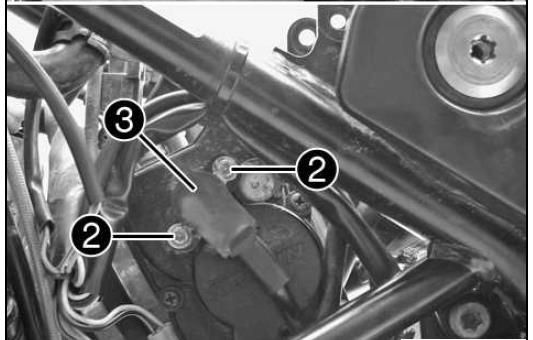
If the value is incorrect you need to adjust the TPS that is on |
|
left side of the bike (item 3 below), it�s on the same side as |
|
where you unplug the motor drive connector. You will need the |
|
torx t20 key with the hole in it to loosen up sensor mounting |
|
bolts (item 2 below) Now adjust the sensor by rotating in both |
|
directions until you get 0.50-0.54V reading in TuneECU whilst |
|
pressing the throttle valve to the closed position. The TuneECU |
|
reading has some lag so don�t expect the voltages to drop |
|
instantly. |
|
Now make sure that the voltage reading stays adjusted AFTER you |
|
screw the sensor bolts tight. |
|
Release the throttle valve and open and close the throttle 10 |
|
times. |
|
Carefully close the throttle valve again with your finger and |
|
recheck the reading. |
|
Continue the process until you get a consistent result. |
|
http://i168.photobucket.com/albums/u195/Elponkin/TuneECU/d_zps0eca926e.jpg |
|
5. Next check that the upper voltage value returns to 0.70-0.74V |
|
when you are NOT pressing the throttle valve to the closed |
|
position. This is referred to in the manual as the Throttle |
|
Position Sensor Circuit A Emergency running position � Voltage |
|
�THAD�. |
|
Release the throttle valve and open and close the throttle 10 |
|
times. |
|
If the value is incorrect you need to adjust as follows: |
|
Locate the adjustment point on the RH side of the throttlebody. |
|
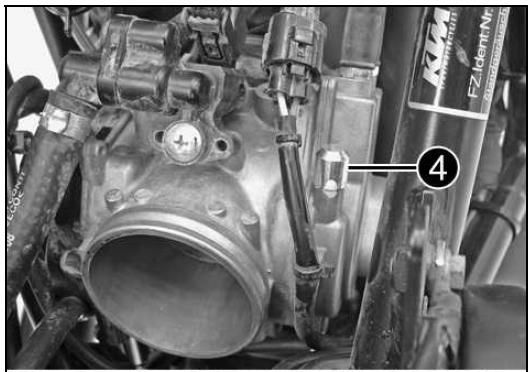
http://i168.photobucket.com/albums/u195/Elponkin/TuneECU/e_zps83eb8596.jpg |
|
You need to unscrew the cap (item 4 - it is called the fuse |
|
cover in the manual) it is held on with varnish so can be tight |
|
and difficult to remove. Once removed it will reveal the |
|
adjustment screw and locknut. |
|
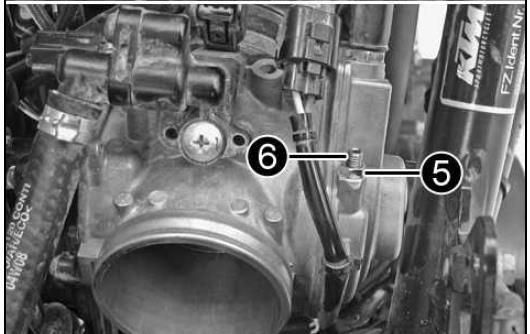
http://i168.photobucket.com/albums/u195/Elponkin/TuneECU/f_zps47c53f23.jpg |
|
Loosen the nut (item 5) and adjust the voltage with screw (item |
|
6). |
|
I found the manual guide not working for me since the top fuse |
|
cap was glued on to screw no.6 and nut no.5 was glued so hard to |
|
screw no.6 that I needed to take it out completely and use some |
|
method to hold screw no.6 while I turn nut no.5. |
|
Also you need to ensure the screw is making contact with the |
|
throttle valve so turn it until you see a change in voltage and |
|
then back it off until you achieve the correct value. |
|
Once you get this top voltage reading to 0.70-0.74V recheck the |
|
value after opening and closing the throttle 10 times until you |
|
get consistent results. Refit the cap. |
|
6. Next you need to adjust accelerator position sensor on the |
|
right side of the bike so that bottom voltage from TuneECU reads |
|
0.70-0.74V this is called the Throttle Grip Sensor � Voltage |
|
�APAD�. |
|
http://i168.photobucket.com/albums/u195/Elponkin/TuneECU/g_zps3565dbaa.jpg |
|
Its same procedure as the TPS only by using sensor on the right |
|
hand side of the throttle body (opposite side from the TPS). |
|
Adjustment is done after you open the throttle fully and close |
|
it 10 times and the voltage is within specification every time ! |
|
http://i168.photobucket.com/albums/u195/Elponkin/TuneECU/h_zps6a068486.jpg |
|
7. You need to turn the ignition off and back on, then wait |
|
until it connects to TuneECU and check AGAIN if all 3 voltages |
|
are in still within specification range. |
|
Dont forget to do this after any sensors adjustment! |
|
#Post#: 292-------------------------------------------------- |
|
690 Enduro EFI -- Idiot's Guide link (part V) |
|
By: Rusty Shovel Date: February 13, 2014, 9:31 am |
|
--------------------------------------------------------- |
|
Chapter 8 |
|
Stories |
|
A success story on loading maps |
|
This morning, I have installed the Evo 1 Airbox Lid, �21 from |
|
KTM dealer and mapped the bike with the KM765EU11B0232 maps |
|
using TuneECU, did the 15min idle initialisation run, turned off |
|
ignition, TPS reset, slowly open throttle to 100% and then |
|
slowly back down, I did this twice just in case and switch off |
|
the bike. During the 15min idle procedure, I even noticed the |
|
idle is much better than with standard Akra maps, you get this |
|
erratic idling when you start the bike, but with these maps, |
|
much better. Idle seems to be around 1650 after the 15mins idle |
|
procedure, blipped the throttle in neutral and 1st gear, no |
|
stalling so far. Went for a quick ride ... what a difference, |
|
it's a new bike, the Akra pipe even sounds better, especially |
|
when accelerating hard (front wheel also lifts, idle revs are |
|
constant ... |
|
Throttle adjustment story |
|
Sourced from: |
|
Post #144 |
|
http://advrider.com/forums/showthread.php?t=685657&page=10 |
|
http://advrider.com/forums/showthread.php?t=685657&page=10 |
|
A couple important notes that I've learned that solved my |
|
stalling issues (knock on wood), for now anyway. |
|
When adjusting the second voltage value in TuneEcu (upper |
|
voltage value 0.70~.74, butterfly not pressed closed), you |
|
adjust it by way of the nut/stud throttle stop adjuster. This is |
|
the stud that physically stops the movement of the butterfly |
|
when you let the throttle go back to its zero state. In my case, |
|
I was getting a voltage within range BUT, and this is a very |
|
important BUT... the adjuster stud was not resting against the |
|
butterfly stop. I believe this is the reason for my erratic |
|
idling, stalling and intermittent low end issues over all. Since |
|
the butterfly was not physically resting up against the adjuster |
|
stud, once running, it would physically bounce around ever so |
|
slightly causing stalling and other weird intermittent issues |
|
yet when checked with TuneEcu, was still in spec. So when |
|
adjusting this, make sure you screw the adjuster stud in far |
|
enough to see the voltage change a few hundredths of a volt, |
|
then as your backing it out again, watch the point at which the |
|
voltage no longer changes. If the voltage is no longer changing, |
|
the adjuster stud is no longer in contact with the butterfly |
|
stop. After doing this a few times you can actually feel when it |
|
makes contact. It needs to make contact. Having the throttle |
|
cables out of adjustment may also affect this. |
|
Something else I ended up doing was adjusting all the voltage |
|
levels and then immediately firing it up. I only did the |
|
throttle calibration and did not plug in the air box or do the |
|
15 min reset. I'd then see how it idled, test the response, and |
|
do quick blips to try and make it stall etc etc. Then once I was |
|
content, I waited overnight for a cold start & did the 15 min |
|
idle reset. This saved me lots of 15 min idle cycles while I was |
|
learning by trial and error as initially I tried many different |
|
voltage combinations, all within the allowable spec but just a |
|
bit different within the range. In my experience if it stalled |
|
before the idle reset, it would also stall after the idle reset. |
|
Bonus 15-Minute Idle Info! |
|
15 min idle stripped bare |
|
Sourced from Inmate AMa as follows: |
|
http://advrider.com/forums/showpost....&postcount=304 |
|
http://advrider.com/forums/showpost....&postcount=304 |
|
Quoted from Wunderfest thead: |
|
Quote: |
|
Originally Posted by sprouty115 |
|
Just got back from my dealer. For $39, he loaded the "...233" |
|
map and did an abbreviated idle reset adaptation. Basically |
|
pushed the bike outside, started it up and let it idle until the |
|
fan came on then said I was good to go. I was always under the |
|
impression that it was supposed to be done with the engine cold? |
|
I figured I'd just do it myself tomorrow morning unless I was |
|
mistaken? |
|
I have heard the same from few other sources. At least one of |
|
them is also a KTM dealer. In that case, the customer was |
|
advised to perform a longer idle next morning when the engine is |
|
cold again. |
|
Let's start from the KTM 690 Service Manual: |
|
Initialization run is advised to do after two things; adjustment |
|
of APAD and THAD voltages and ECU flashing (re-mapping). Both |
|
include adaptations reset, APAD+THAD operation icludes "ECU |
|
Reset" with diagnostics tool and flashing erases the adaptation |
|
as the new map is installed. |
|
"Start the engine and perform a initialization run. Guideline: |
|
15 min." |
|
Nothing about throttle calibration or stone cold engine. <- I |
|
think this wisdom originates from here: |
|
http://www.monomaniacs.nl/tnt/KTM-69...hrottle-issues |
|
http://www.monomaniacs.nl/tnt/KTM-69...hrottle-issues |
|
"2. Idle reset procedure |
|
The 'famous' 15 minute idle reset procedure. This resets the |
|
adaptive base values of the ECU. It won't transform the bike but |
|
it can make a worthwhile improvement. It is very important that |
|
the engine is stone cold. One or two hours after riding is not |
|
enough! Do this after the bike has been off for a full night or |
|
day. Start the engine and let it idle for 15 minutes without |
|
touching anything. After 15 minutes, switch the engine off with |
|
the ignition key. Done. During this procedure you won't see or |
|
hear anything happening besides the idling and (probably) the |
|
fan. Don't worry, the reset is done. Besides after certain |
|
maintenance or parts replacement, you could consider doing it |
|
twice a year with the turning of the seasons. A reset for the |
|
colder autumn & winter period and one time for warmer conditions |
|
during spring & summer. This is not mandatory or needed and |
|
don't expect miracles." |
|
Where does this come from? Maybe one possibility is KTM 990 |
|
initialization. From Tune ECU website: |
|
"990cc models SD, SM, and Adventure: |
|
After download from an new map, you must perform an |
|
initialization run. |
|
The 990s must be on the center stand, and are thus stand |
|
vertically. For SD / SM models use a Paddock |
|
Stands or the side stand with a piece of wood underneath. |
|
The engine must be cold. |
|
There should be the coolest possible air temperature outside, |
|
this can be very helpful for a lower fuel consumption. |
|
Start the engine and let it run at idle for 15 minutes. During |
|
these 15 minutes, not use the throttle or any other functions. |
|
The 15 minutes need to be strictly adhered to, and must not fall |
|
below. The time can only be exceeded by |
|
a maximum of one minute. |
|
Should the engine go out, then re-start ONLY, do not begin 15 |
|
minutes again. (Source: German KTM Forum) |
|
If you want to perform an initialization run only, you must |
|
first reset in any case the adaptation. |
|
(Source: LC8 German KTM Forum)" |
|
Sounds familiar to me. These are the guidelines that come up in |
|
many KTM sites now and then when discussing KTM 690 15 min idle |
|
also. |
|
What does the ECU do during 15 min idle? |
|
It is advised to do after ECU adaptations reset. Clearly the ECU |
|
has to adapt to something and I think that it has something to |
|
do with intake air temperature (IAT), manifold abolute pressure |
|
(MAP), amount of RPM and lambda voltage. Engine's suction and |
|
exhaust pressure are changed when hardware has been changed and |
|
so is engine's volumetric efficiency (VE) which has a lot to do |
|
with the injection pulse width. During the 15 min ECU adjusts |
|
injection pulse width and ignition advance as the IAT rises. I |
|
think that the ECU is aiming to a leanest possible mix that |
|
gives constant idle and is "learning" the right pulse width and |
|
ignition advance to whole IAT/coolant temp range. Or adapting to |
|
conditions, which are changed after hardware modding. If this is |
|
so, the 15 min is not needed for a new map per se, it is needed |
|
because the new map has no valid adaptations for current |
|
hardware. Also, then 15 min is important every time when |
|
hardware has been changed. For example a airbox cover removal or |
|
slip-on installation. |
|
What I have experienced: |
|
I have done 15 mins to stone cold, warm and hot engine, maybe 20 |
|
to 30 times after re-mapping my bike. Most of the times it has |
|
been done stone cold. I have never accomplished to get solid 15 |
|
min to warm or hot engine without stalling. Of course it is just |
|
my bike, I'm not saying it is impossible. There can always be |
|
something else. Also, when 15 min ends prematurely to stall, my |
|
bike has always had poor idle and driveability at low rpm. Once |
|
the 15 min has been done by dealer, warm engine, stalling and |
|
poor idling. The advise was "Well, maybe it gets better with |
|
time" ..... |
|
Conclusion: |
|
I will do the 15 min initialization to stone cold just to be |
|
sure. It won't harm anything and I like to keep the loose ends |
|
out of the equation. |
|
#Post#: 3328-------------------------------------------------- |
|
Re: 690 Enduro EFI -- Idiot's Guide link (part I) |
|
By: Dirk Diggler Date: December 19, 2015, 1:08 pm |
|
--------------------------------------------------------- |
|
That YouTube video of TuneECU on the Tiger 1050 is me ;D |
|
Looking forward to getting into the ECU on the KTM next... |
|
***************************************************** |