|
Title: Why one would use Qubes OS? |
|
Author: Solène |
|
Date: 17 June 2023 |
|
Tags: security qubesos feedback |
|
Description: In this article, I'm sharing my feelings about Qubes OS, |
|
what it is and why I like it |
|
|
|
# Intro |
|
|
|
Hello, I've been talking a lot about Qubes OS lately but I never |
|
explained why I got hooked to its offer. It's time to tell why I like |
|
it. |
|
|
 |
Qubes OS official project website |
|
|
 |
Puffy asks Solene to babysit the girl. Solene presents her latest creation. (ar… |
|
Artwork by Prahou |
|
|
|
# Presentation |
|
|
|
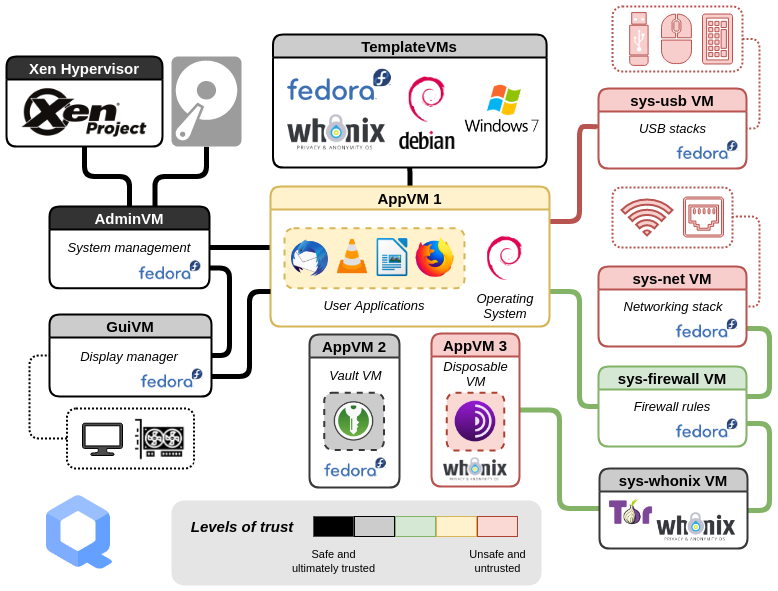
Qubes OS is like a meta system emphasizing on security and privacy. |
|
You start on an almost empty XFCE interface on a system called dom0 |
|
(Xen hypervisor) with no network access: this is your desktop from |
|
which you will start virtual machines integrating into dom0 display in |
|
order to do what you need to do with your computer. |
|
|
|
Virtual Machines in Qubes OS are called qubes, most of the time, you |
|
want them to be using a template (Debian or Fedora for the official |
|
ones). If you install a program in the template, it will be available |
|
in a Qube using that template. When a Qube is set to only have a |
|
persistent /home directory, it's called an AppVM. In that case, any |
|
change done outside /home will be discarded upon reboot. |
|
|
|
By default, the system network devices are assigned to a special Qube |
|
named sys-net which is special in that it gets the physical network |
|
devices attached to the VM. sys-net purpose is to be disposable and |
|
provide network access to the outside to the VM named sys-firewall |
|
which will be doing some filtering. |
|
|
|
All your qubes using Internet will have to use sys-firewall as their |
|
network provider. A practical use case if you want to use a VPN but |
|
not globally is to create a sys-vpn Qube (pick the name you want), |
|
connect it to the Internet using sys-firewall, and now you can use |
|
sys-vpn as the network source for qubes that should use your VPN, it's |
|
really effective. |
|
|
|
If you need to use an USB device like a microphone and webcam in a |
|
Qube, you have a systray app to handle USB pass-through, from the |
|
special Qube sys-usb managing the physical USB controllers, to attach |
|
the USB device into a Qube. This allows you to plug anything USB into |
|
the computer, and if you need to analyze it, you can start a disposable |
|
VM and check what's in there. |
|
|
|
Qubes OS trust level architecture diagram |
|
|
|
## Pros |
|
|
|
* Efficient VM management due to the use of templates. |
|
* Efficient resource usage due to Xen (memory ballooning, |
|
para-virtualization). |
|
* Built for being secure. |
|
* Disposables VMs. |
|
* Builtin integration with Tor (using whonix). |
|
* Secure copy/paste between VMs. |
|
* Security (network is handled by a VM which gets the physical devices |
|
attached, hypervisor is not connected). |
|
* Practical approach: if you need to run a program you can't trust |
|
because you have too (this happens sometimes), you can do that in a |
|
disposable VM and not worry. |
|
* Easy update management + rollback ability in VMs. |
|
* Easy USB pass-through to VMs. |
|
* Easy file transfer between VMs. |
|
* Incredible VM windows integration into the host. |
|
* Qubes-rpc to setup things like split-ssh where the ssh key is stored |
|
in an offline VM, with user approval for each use. |
|
* Modular networking, I can make a VPN in a VPN and assign it to other |
|
VM but not all. |
|
* Easily extensible as all templates and VMs are managed by Salt Stack. |
|
|
|
## Cons |
|
|
|
* No GPU acceleration for rendering (no 3D programs, high CPU usage for |
|
video/conferencing). |
|
* Limited hardware support due to Xen. |
|
* Requires a powerful system (high CPU requirement + the more RAM the |
|
better). |
|
* Qubes OS could be a choice by default because there is no competitor |
|
(yet). |
|
* The project seems a bit understaffed. |
|
* Hard learning curve. |
|
* Limited templates offer: Fedora, Debian and whonix are officials. |
|
The community provides extra templates based on Gentoo, Kali or Cent OS |
|
8. |
|
* It's meant for a single person use only for a workstation. |
|
|
|
# My use case |
|
|
|
I tried Qubes OS early 2022, it felt very complicated and not efficient |
|
so I abandoned it only after a few hours. This year, I did want to try |
|
again for a longer time, reading documentation, trying to understand |
|
everything. |
|
|
|
The more I used it, the more I got hooked by the idea, and how clean it |
|
was. I basically don't really want to use a different workflow |
|
anymore, that's why I'm currently implementing OpenKuBSD to have a |
|
similar experience on OpenBSD (even if I don't plan to have as many |
|
features as Qubes OS). |
|
|
|
My workflow is the following, this doesn't mean it's the best one, but |
|
it fits my mindset and the way I want to separate things: |
|
|
|
* a Qube for web browsing with privacy plugins and Arkenfox user.js, |
|
this is what I use to browse websites in general |
|
* a Qube for communication: emails, XMPP and Matrix |
|
* a Qube for development which contains my projects source code |
|
* a Qube for each work client which contains their projects source code |
|
* an OpenBSD VM to do ports work (it's not as integrated as the other |
|
though) |
|
* a Qube without network for the KeePassXC databases (personal and |
|
per-client), SSH and GPG keys |
|
* a Qube using a VPN for some specific network tasks, it can be |
|
connected 24/7 without having all the programs going through the VPN |
|
(or without having to write complicated ip rules to use this route only |
|
in some case) |
|
* disposable VMs at hand to try things |
|
|
|
I've configured my system to use split-SSH and split-GPG, so some qubes |
|
can request the use of my SSH key in the dom0 GUI, and I have to |
|
manually accept that one-time authorization on each use. It may appear |
|
annoying, but at least it gives me a visual indicator that the key is |
|
requested, from which VM, and it's not automatically approved (I only |
|
have to press Enter though). |
|
|
|
I'm not afraid of mixing up client work with my personal projects due |
|
to different VM use. If I need to make experimentation, I can create a |
|
new Qube or use a disposable one, this won't affect my working systems. |
|
I always feel dirty and unsafe when I need to run a package manager |
|
like npm to build a program in a regular workstation... |
|
|
|
Sometimes I want to experiment a new program, but I have no idea if |
|
it's safe when installing it manually or with "curl | sudo bash". In a |
|
dispoable, I just don't care, everything is destroyed when I close its |
|
terminal, and it doesn't contain any information. |
|
|
|
What I really like is that when I say I'm using Qubes OS, for real I'm |
|
using Fedora, OpenBSD and NixOS in VMs, not "just" Qubes OS. |
|
|
|
However, Qubes OS is super bad for multimedia in general. I have a |
|
dual boot with a regular Linux if I want to watch videos or use 3D |
|
programs (like Stellarium or Blender). |
|
|
|
Qubes OS blog: how to organize your qubes: different users share their workflows |
|
|
|
# Why would you use Qubes OS? |
|
|
|
This is a question that seems to pop quite often on the project forum. |
|
It's hard to reply because Qubes OS has an important learning curve, |
|
it's picky with regard to hardware compatibility and requirements, and |
|
the pros/cons weight can differ greatly depending on your usage. |
|
|
|
When you want important data to be kept almost physically separated |
|
from running programs, it's useful. |
|
|
|
When you need to run programs you don't trust, it's useful. |
|
|
|
When you prefer to separate contexts to avoid mixing up files / |
|
clipboard, like sharing some personal data in your workplace Slack, |
|
this can be useful. |
|
|
|
When you want to use your computer without having to think about |
|
security and privacy, it's really not for you. |
|
|
|
When you want to play video games, use 3D programs, benefit from GPU |
|
hardware acceleration (for machine learning, video encoding/decoding), |
|
this won't work, although with a second GPU you could attach it to a |
|
VM, but it requires some time and dedication to get it working fine. |
|
|
|
# Security |
|
|
|
Qubes OS security model relies on a virtualization software (currently |
|
XEN), however they are known to regularly have security issues. It can |
|
be debated whether virtualization is secure or not. |
|
|
|
Qubes OS security advisory tracker |
|
|
|
# Conclusion |
|
|
|
I think Qubes OS has an unique offer with its compartmentalization |
|
paradigm. However, the required mindset and discipline to use it |
|
efficiently makes me warn that it's not for everyone, but more for a |
|
niche user base. |
|
|
|
The security achieved here is relatively higher than in other systems |
|
if used correctly, but it really hinders the system usability for many |
|
common tasks. What I like most is that Qubes OS gives you the tools to |
|
easily solve practical problems like having to run proprietary and |
|
untrusted software. |